

When you evaluate the Trial Migrate Aggregate Object Report, examine what would happen to the migrated objects, and examine any reported error messages. The following is a sample view:
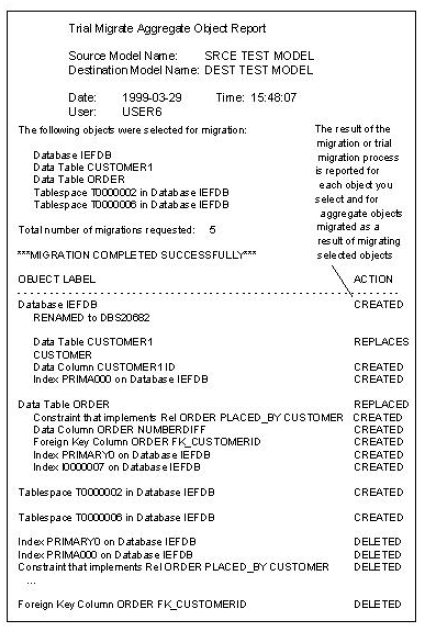
The following table illustrates migration report information messages:
|
Action |
Indicates |
Object Label in Both Models |
|---|---|---|
|
CREATED |
The source model object did not exist in the destination model; therefore this object was added to the destination model. See also RENAMED, which occurs only in conjunction with CREATED. |
N/A |
|
DELETED |
The source model object's components did not include this component found in the destination model; therefore, this object was deleted. |
N/A |
|
RENAMED |
The source model object was added to the destination model, but renamed as specified because the destination model already contains another object with that object name; where the object with the same name is not equivalent to the object being migrated. |
N/A |
|
REPLACED |
The source model object replaced the equivalent destination model object. |
The same |
|
REPLACES |
The source model object replaced, and consequently renamed, the equivalent destination model object. |
Different |
|
SEE ABOVE |
The object was already migrated as a consequence of migrating another object; see the previously reported action on this object. |
N/A |
Note: The RENAMED action on a Trial Migrate Aggregate Object Report sometimes indicates the need for adoption. See Sample Trial Migrate Aggregate Object Report.
When you examine the Trial Migrate Aggregate Object Report, you can notice certain outcomes that are different from what you expected. For example:
|
Copyright © 2013 CA.
All rights reserved.
|
|