

Migrating Objects from One Model to Another › FAQs About Migration › How Does Migration Work? › Migration Replaces Objects with Common Ancestry
Migration Replaces Objects with Common Ancestry
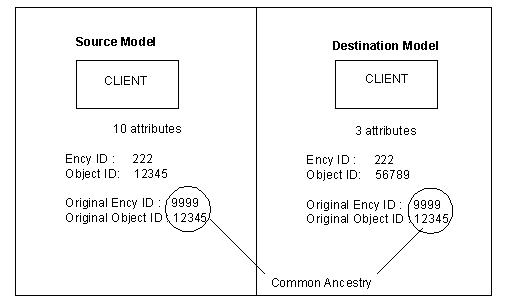
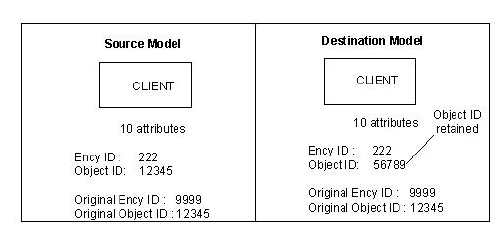
The following pair of figures provide a before and after view of migration of an aggregate object, where an object in the destination model is equivalent to the object being migrated.
- Different Objects Before Migration—Equivalence Through Common Ancestry shows an aggregate object, CLIENT, with ten components in the source model and an equivalent object, CLIENT, with only three components in the destination model.
- Same Objects After Migration—Equivalence Through Common Ancestry illustrates what happens when the aggregate object that has ten components is selected from the source model for migration. Migration replaces the equivalent aggregate object in the destination model. Assuming that three of the ten components of the aggregate object in the source model are equivalent to the three components in the destination model, the three components of the replaced aggregate object are replaced in the destination model and the seven components that did not exist in the destination model are created. The following is a sample view:
Copyright © 2013 CA.
All rights reserved.
|
|