

The Client Server Encyclopedia (CSE) Construction Client currently allows remote installations only. A remote installation is one in which an Installation Toolset is used to compile, link, and bind the source code generated by the CSE or a workstation toolset. The remote installation target environment may or may not be the same as the Construction Client's environment.
After the actual code is generated, remote installation creates a set of remote files that contain all of the components necessary to compile and install the application components on a target system. You must move these remote files to the target system and install them in an environment supported by CA Gen before using the application. Remote installation requires the presence of certain CA Gen components on the selected target system.
If you are using External Action Blocks in the application, you must complete, compile, and link edit them outside of the Construction Client. Move them to the target environment and add them to the application using the appropriate methods for the Installation Toolset. For more information, see the documentation for the Installation Toolset being used.
If an application, including Cooperative Server applications that target CICS or IMS, is to be used on a z/OS platform and you have the Host Encyclopedia Construction Toolset installed on the host where the application is to execute, it is not necessary to create remote files using the CSE Construction Client. Instead, you can check in the model and perform construction on the Host to generate and install the application. Ensure the Cooperative Servers are packaged before checking in the model.
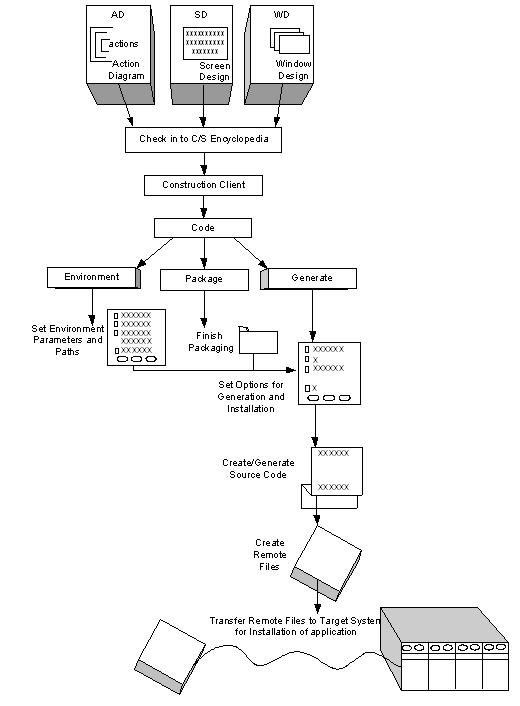
The following illustration provides an overview of the process for generating remote files:
|
Copyright © 2013 CA.
All rights reserved.
|
|