

A dialog flow transaction code is used by the Dialog Manager to manage flows (links and transfers) between procedure steps. The following illustration shows the relationship between procedure steps and dialog flow transaction codes.
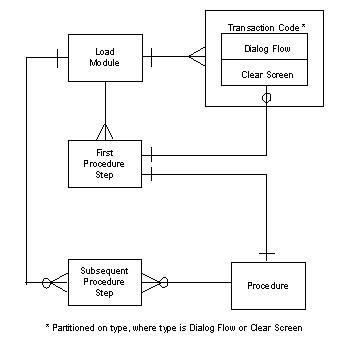
Each load module has one or more dialog flow transaction codes assigned to it. A dialog flow transaction code can belong to only one load module. Each load module has one or more procedure steps defined to it. The dialog flow transaction codes are assigned to the procedure steps (if they are flowed to from another procedure step). The same dialog flow transaction code can be assigned to more than one procedure step.
The TP monitor uses the dialog flow transaction code to determine which load module to execute. The transaction manager uses the input data (which identifies the procedure step name at runtime) to determine which procedure step to execute.
A sample mapping of transaction codes for a single load module appears in the following table:
|
Load Module Contains: |
Clear Screen Transaction Code |
Dialog Flow Transaction Code |
Description |
|
|---|---|---|---|---|
|
P1 PS1 |
A |
A |
Can be invoked directly or through dialog flow |
|
|
P1 PS2 |
|
A |
Second procedure step in P1 cannot be invoked directly, only through dialog flow |
|
|
P2 PS1 |
B |
A |
Can be invoked directly or through dialog flow |
|
|
P3 PS1 |
|
A |
Cannot be invoked directly; no clear screen transaction code |
|
|
P4 PS1 |
|
C |
Cannot be invoked directly; no clear screen transaction code |
|
Note: Pn = Procedure; PSn-Procedure step; where n represents the name of the component.
Procedure steps that cannot be invoked from a clear screen (P3 and P4) must have a dialog flow transaction code assigned. This type of procedure step is always accessed (flowed to) from another procedure step or a “formatted” screen. For example, in a multistep procedure (P1), the second and subsequent procedure steps can only be invoked by dialog flow transaction codes. Only the first procedure step in this example may be accessed by a clear screen transaction code, a dialog flow transaction code, or both.
A load module with a single procedure step assigned to it may have both types of transaction codes:
Note: The dialog flow transaction code is not used to determine the load module to execute on a return from a link. The transaction code used on a return from link is the transaction code that was active when the link was initiated.
|
Copyright © 2013 CA.
All rights reserved.
|
|