

The <iefmd>.ini file is the Message Dispatcher configuration file, which contains information about the way the servers and their utilities are started. You configure the file during the server installation. The default file name is iefmd.ini. If you entered a different name during the installation, the file name will be what you entered.
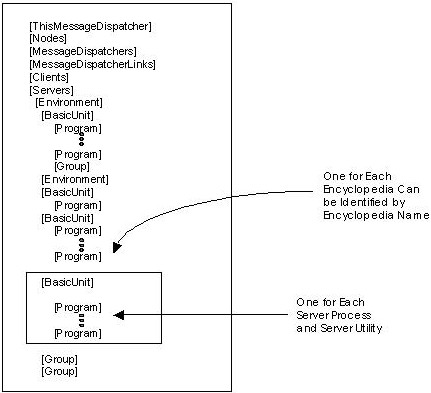
The following figure outlines the <iefmd>.ini file. It focuses on the Server Environment section of the file that contains all references to the server utilities. You can adjust this section after the installation.
Other sections of the file are set during the installation and can be changed by reinstalling the software and selecting different parameters.
Note: For more information, see Configure a CSE Server Environment in the CA Gen Client Server Encyclopedia User Guide.
The following is an outline of the <iefmd>.ini file:
After the installation and as you use your CSE, adjust the <iefmd>.ini file to accommodate your changing needs. Work with the <iefmd>.ini file for the following tasks:
|
Copyright © 2013 CA.
All rights reserved.
|
|