

With CA Gen, security is a function of the distributed processing client, client manager, transaction environment, and distributed processing server software.
The identification of the user is a function of the client or client manager software.
The user ID and password are both available in action diagramming statements. Therefore the user ID and password can be entered by the user in a graphical user interface and set in an action diagram statement or set in an action diagram statement by the system designer. The graphical user interface in this case is probably part of the user login process.
If the client software does not identify the user, it can be done at the client manager level through a login process or using the client manager configuration files.
The client manager has the responsibility to derive the security data to be used for each cooperative request. A cooperative request is the instance of the data flowing as a result of a remote use statement or a link flow.
Assuming the server transaction environment has enabled security, for example the asynchronous daemon is started with the -l option or a CICS connection is enabled for attach time security, then the target server uses the security data to grant access to users which it deems authorized. At the server, the security data is checked. How the check is performed varies by server environment.
The following illustration shows how security is implemented. The top portion of the illustration provides the implementation for a client-to-server procedure interaction and the middle portion of the figure shows the implementation for a server-to-client procedure interaction and the lower portion of the illustration shows the implementation for a communications bridge.
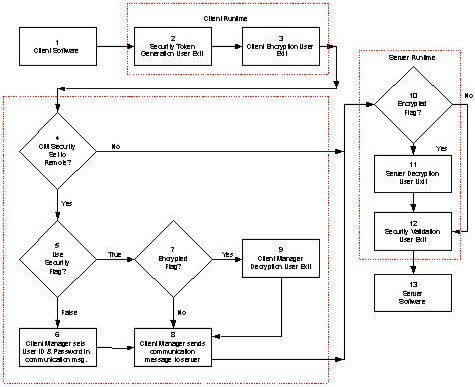

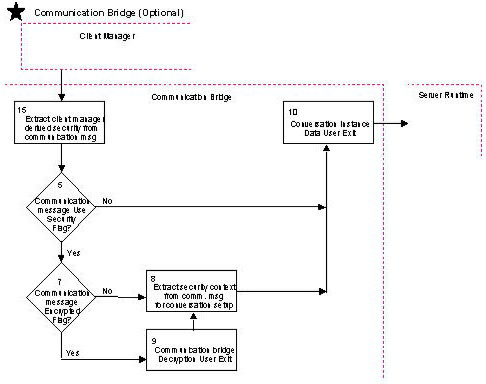
The following table provides descriptions of the parts of this illustration.
|
Key |
Description |
|---|---|
|
1 |
The client software is the code generated from the action diagramming statements in the client procedures. The user ID and password are both available in action diagramming statements. Therefore the user ID and password can be entered by the user in a graphical user interface and set in an action diagram statement or set in an action diagram statement by the system designer. |
|
2 |
The Cooperative Runtime constructs the communication message and invokes the security token user exit. This security token user exit has the ability to influence whether the security data will be placed into the communication message. The security data can be supplemented by the generation of a security token using external security software such as adding Kerberos capability. The user exit allows you to enter the length of the token along with the value of the token itself. |
|
3 |
Encryption is not required, but this user exit is invoked in the case you require encryption to be used. The client encryption user exit allows you to use your own or a third-party encryption capability. This routine encrypts the communication message from the client software to the server software. If the user exit return value indicates that encryption was used, the runtime will set a flag in the communication message indicating the communication message is encrypted. This allows the client manager and server runtime to know that the communication message is encrypted. Note: This implies that you will need to use a decryption routine that will decrypt according to the encryption routine used. |
|
4 |
Each target server configured in the Client Manager has an associates security level which can be set to remote, defer, or none. The default security level in the Client Manager can be set to none or remote. For more information, see the Distributed Processing - Overview Guide and the Distributed Processing - Client Manager Guide. A security level associated with a target server can be set to remote in one of two ways:
In both of these cases, the target server security will be derived to be remote. |
|
5 |
The client manager needs to determine where to obtain the security data to be used for conversation start up. If you set the flag in the security token user exit to:
|
|
6 |
Derive the user ID and password for the target server that will be used in the conversation setup. At this point the security level of the target server has been derived as remote, the user ID and password will first be assigned from the target server information. If both the user ID and password are blank in the target server, then the conversation setup security information is obtained from the client manager defaults. If the user ID and/or password are defined in the target server, then the conversation setup security information is obtained from the target server. If both the user ID and password are blank in the target server and blank in the client manager, then blanks will be used for both the user ID and password in the conversation setup security information. |
|
7 |
The client manager checks to see if the security information from the client software is encrypted. This flag was set by the cooperative runtime based on information returned from the client encryption user exit. If the flag is set to:
|
|
8 |
Extract the security data information out of the communication message (as opposed to deriving the information from the client manager configuration - see #6). |
|
9 |
This user exit allows for the use of your own or a third-party decryption capability to decrypt the communication message. Note: A key point here is that the decryption routine used for the client manager and the communication bridge (if used) must decrypt the information correctly from the encryption routine used in client encryption user exit. |
|
10 |
The conversation instance data user exit provides the opportunity to interrogate, use, or modify the selected user ID and/or password that will be used by the conversational transport LU6.2. Example: Translate a lower case password to upper case. The user exit can be enabled or disabled. This user exit is called during the initialization of the client manager and communication bridge (if used). If the user exit returns disabled, it will not be invoked as long as the client manager (or communication bridge) is running. If the user exit returns enabled, it will be invoked for each conversation. Note: Any modifications made to the user ID and/or password in this user exit do not change the information in the communication message. The extracted, and possibly modified, data is for use only by the target server's associated transport layer. |
|
11 |
The server runtime checks the communication message to see if the flag is set indicating whether the communication message is encrypted or not. If the communication message is encrypted, the server decryption user exit is invoked. |
|
12 |
The server decryption user exit allows you to use your own or a third-party decryption capability. This routine decrypts the communication message from the client software. Note: A key point here is that the decryption routine used on the server must decrypt the information correctly from the encryption routine used in the cooperative runtime. |
|
13 |
This user exit allows you to use your own or a third-party security package in the server environments. |
|
14 |
The server software is the code generated from the action diagramming statements in the server procedures. |
|
15 |
Extract the client manager derived security data from the communication message. See #6 for how the security data was derived in the client manager. |
The following table provides security level, user ID, and password examples for target server, client manager, and derived security data.
|
|
Target Server |
Client Manager |
Derived |
|---|---|---|---|
|
Security level |
remote |
none or remote |
|
|
Security level |
remote |
none or remote |
|
|
Security level |
remote |
none or remote |
|
|
Security level |
remote |
none or remote |
|
|
Security level |
remote |
none or remote |
|
|
Security level |
remote |
none or remote |
|
|
Security level |
remote |
none or remote |
|
|
Security level |
defer |
remote |
|
|
Security level |
defer |
remote |
|
|
Security level |
defer |
remote |
|
|
Security level |
defer |
remote |
|
|
Security level |
defer |
remote |
|
|
Security level |
defer |
remote |
|
|
Security level |
defer |
remote |
|
|
Copyright © 2013 CA.
All rights reserved.
|
|