

The FILTER statement filters an updateable repeating group view to show only those occurrences of the view that match a filter character expression. The occurrences that are not shown remain in the group view and can be redisplayed by using the UNFILTER statement
The filter-character-expression contains an attribute, an operator (=, >, < and so forth), and a value.
Attribute expressions can be strung together by using and and or operators.
For example, a filter to extract accounts in ZIP Code 75208 with a balance of over $10,000 can be expressed as:
zipcode = 75208 and balance > 10000”
As recommended for the SORT statement, the filter character expression should be a character view for ease of maintenance and flexibility.
A dialog box can be used to construct the filter expression, as shown in the following illustration.
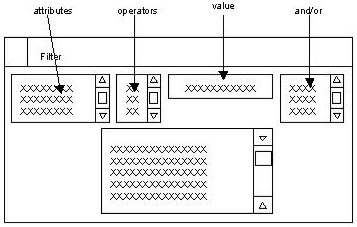
The four boxes at the top of the dialog box (attributes, operators, value, and and/or) are the components of the filter expression. The user selects from these options.
The field on the bottom of the dialog box shows the FILTER expression as it is being constructed. The user undoes by double-clicking the filter expression line that is being constructed in the list box at the bottom of the FILTER dialog box.
The next sample code shows the use of the FILTER statement.
|
Copyright © 2013 CA.
All rights reserved.
|
|