

 --- ACCOUNT_METADATA
|      IMPORTS:
|      EXPORTS:
|      LOCALS:
|      ENTITY ACTIONS:
|
|    SET output_entity metadata entity_type TO ACCOUNT
|    SET SUBSCRIPT OF export_sort_from TO 0
|    SET SUBSCRIPT OF export_sort_from TO SUBSCRIPT OF
|        export_sort_from + 1
|    SET export_sort_from_line metadata name TO Account
|    SET export_sort_from_line metadata length TO 4
|    SET export_sort_from_line metadata number  TO 04
|    SET export_sort_from_line metadata type TO N
|    SET SUBSCRIPT OF export_sort_from TO SUBSCRIPT OF
|        export_sort_from +1
|    SET export_sort_from_line metadata name TO Description
|    SET export_sort_from_line metadata length TO 25
|    SET export_sort_from_line metadata number TO 02
|    SET export_sort_from_line metadata type TO T
|    SET SUBSCRIPT OF export_sort_from TO SUBSCRIPT OF
|        export_sort_from +1
|    SET export_sort_from_line metadata name TO Type
|    SET export_sort_from_line metadata length TO 1
|    SET export_sort_from_line metadata number TO 03
 --- SET export_sort_from_line metadata type TO T
The sample code shows the loading of data containing each attribute's name, length, sequence number, and domain in the view.
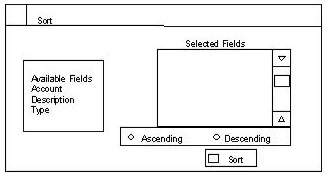
The attribute names are displayed on a dialog box. The user then selects the attributes in the preferred sort order. As the fields are selected, they are displayed in the selected fields list box.
Radio buttons on the dialog box are used to specify ascending or descending sort, as shown in the following illustration.
The next sample code illustrates the entire sort operation's logic.
|
Copyright © 2013 CA.
All rights reserved.
|
|