

The CLOSE statement can act on both the primary window/dialog box or a secondary dialog box.
CLOSE pertains to only windows or dialog boxes in the current procedure.
A CLOSE statement cannot be executed at the same time as an OPEN for a dialog box. If the window is not open, no runtime error occurs.
A CLOSE for a window or dialog box can be contained in the OPEN event.
If the primary window or dialog box is closed, all secondary dialog boxes are closed.
Control returns to the last active window of the procedure that invoked the closed procedure. If the closed step was the first procedure, then control returns to the operating system.
CLOSE statements are not executed when they are encountered in the action language. They are placed in a FIFO queue. CLOSE statements are executed when the procedure or event handler completes execution.
In CA Gen, no relationship between secondary dialog boxes is maintained. It is the procedure's responsibility to close subordinate boxes if the procedure's structure has established a relationship between secondary dialog boxes.
The following illustration shows how the procedure establishes this relationship.
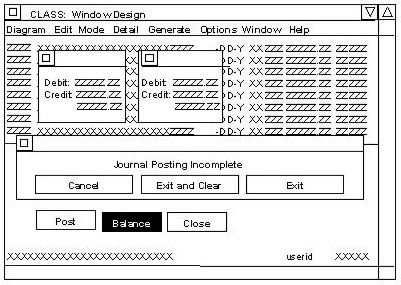
In the illustration, the Journal Entries dialog box is the primary dialog box. Each of the three other dialog boxes is dependent on it.
One of the two smaller dialog boxes is displayed when the balance push button is clicked on the Journal Entries dialog box. A green one is displayed if debits and credits are equal; a red one if they are not.
The third dependent dialog box is displayed when the Post push button is selected, and debits do not equal credits.
Whenever Journal Entries are discontinued, all four dialog boxes are closed.
The logic shown in the code in the next section closes the journal entries box. Therefore, the related boxes must be closed also.
|
Copyright © 2013 CA.
All rights reserved.
|
|