

The following table lists the types of modality you can use in order of increasing freedom to the user.
|
Type |
Description |
|---|---|
|
Modal |
In a fully modal system, the user may follow only one path through the dialog at any one time. When a user opens a modal window, other windows in the same application may be opened only by selecting commands directly from that window, or from windows opened as a result of those commands, and so forth. |
|
Modeless Single-Instance |
A modeless single instance window allows the user to switch to another window without closing the first window. |
|
Modeless Multiple-Instance |
A modeless multiple instance window allows the user to display multiple occurrences of that window, or to switch to another window without closing the first window. |
The following illustration shows the layouts for part of a system where the modality has been varied.
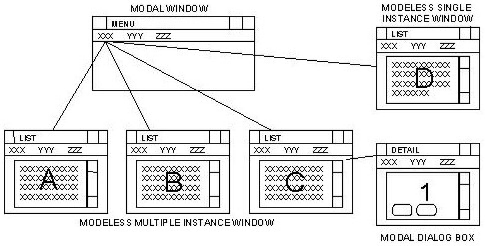
In the illustration, note that only one modal Menu window may be displayed.
The List windows A, B, and C are all displays of the same primary modeless multiple window. They are all associated with the same procedure.
The dialog box 1 is defined as modal; when this dialog box is displayed it must be closed before the user can return to any other window.
Window D is modeless single instance. This lets the user switch to other windows (A, B, C or menu), but only one display of window D is ever shown. This avoids the confusion that can occur when using modeless-multiple instances (windows A, B, C) where the same data can be displayed in many windows. Thus if a user edits the data in one of the many windows displayed, confusion might result as to which window contains the updated data.
|
Copyright © 2013 CA.
All rights reserved.
|
|