

One option in graphical dialog design is to include all listing display and maintenance functionality in a single procedure, as shown in the following illustration.
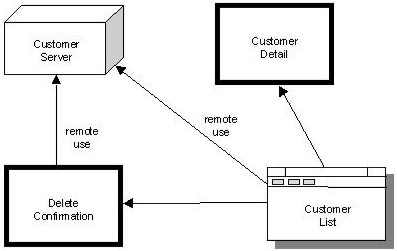
The procedure uses secondary dialog boxes as an auxiliary aid to a primary window.
The following illustration shows an example of the window interaction for a procedure called MAINTAIN CUSTOMER.
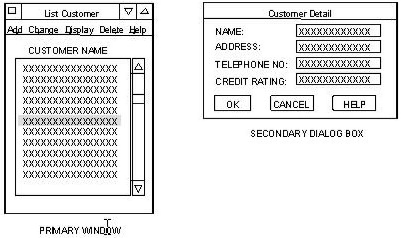
The following list explains the example in the figure:
If you add a new attribute to an entity, and you need to include that attribute on the dialog boxes, you must add the same field to all three dialog boxes. Even a small modification can introduce synchronization errors, and large changes can be extremely difficult to keep compatible in all three dialog boxes. For example, adding several fields and changing field order can introduce numerous synchronization errors.
Users will probably want the three dialog boxes to look the same except for field protection levels.
Another way to modify the design is to specify only one secondary dialog box, based on the Display Customer Detail dialog box. You then modify the appropriate field properties to support the Add, Update, and Delete commands.
Performance may suffer from this approach. Using a list occurrence requires that all data to populate the dialog box be retrieved in the first execution. No procedure logic is executed when the dialog box is initiated. CA Gen uses the values in the selected row in the list and matches them to the fields in the dialog box. If a small amount of data is involved, the disadvantage is minimal. On the other hand, if views of several entity types are to be displayed, this could mean an extensive overhead in building the list.
|
Copyright © 2013 CA.
All rights reserved.
|
|