

Designing the Procedure Interaction › Flows › How Window Manager Controls a Flow
How Window Manager Controls a Flow
The following illustration shows how CA Gen's window manager controls a flow. (The diamond shaped boxes are the decisions being made by the window manager.)
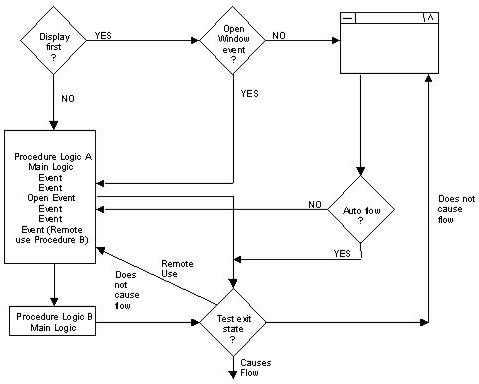
The window manager controls a flow as follows:
- As a procedure is being entered, the CA Gen window manager checks to see if the procedure is Execute First or Display First.
- If the procedure is Display First, the window manager checks to see if the procedure contains an open window event.
- If the procedure contains an open window event, the event is executed, and the primary window or dialog box is opened.
- If the procedure does not contain an open window event, the primary window or dialog box is opened. See How Window Manager Controls a Flow to learn more about open window events.
- If the procedure is Execute First, the main procedure logic is executed. See Choosing a Flow Action to learn more about the Execute First procedure.
- At the end of the execution of the logic, the window manager checks to see if an exit state is set to cause a flow:
- If the exit state is set to cause a flow, go to step 1.
- If the exit state does not cause a flow, the primary window or dialog box associated with this procedure is opened.
- For each selected GUI control that has an associated event, only the event handler logic executes. At the end of each event logic execution, the window manager will check to see if an exit state is set to cause a flow:
- If the exit state is set to cause a flow, go to step 1.
- If the exit state does not cause a flow, the window is presented, along with any dialog box that may have been opened in the event.
- If any of the GUI controls are associated with a command that is designed as an autoflow on a flow the flow executes immediately. Go to step 1. See Using Autoflows to learn more about executing flows in this manner.
- During any of the procedures main logic or event logic, if a remote use to another procedure is executed, the control is passed to the destination procedure. Upon return to this procedure, the window manager checks the value of the exit state to see if it causes a flow to another procedure.
Copyright © 2013 CA.
All rights reserved.
|
|