

Perform prototyping to check the completeness and usability of support for user tasks, and to refine the design of the user interface.
A useful method for verifying the design with business persons is to convert the user interface structure into a computer-based prototype.
The following illustration shows this method.
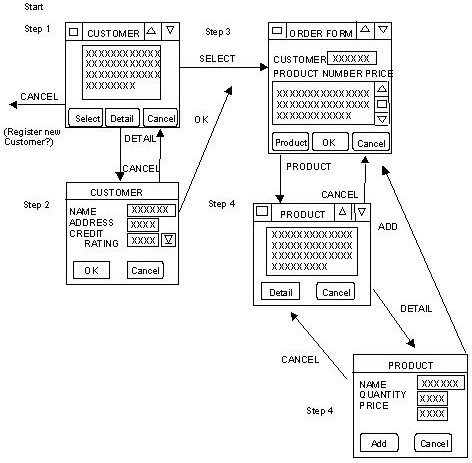
The prototype should demonstrate the graphical user interface, windows, dialog boxes, pull-down menus, pushbuttons, radio buttons, check boxes, and so forth.
The data usage identified earlier provides a useful basis for the design of the user interface. For example, you can base form layouts in the user interface on forms currently in use. An on-screen product catalog can mimic a paper-based one.
For client/server environments, it is important to look for opportunities for front-end integration. For example, if the user regularly needs to switch between two tasks or use of data, the graphical user interface should make the switch easy. If, for instance, users can be logged on to more than one information system at a time, where previously they had to log on and off each one in turn, this could lead to substantial time-saving.
It should be possible to move between the displays and dialogs so that the usability of the flow of the system can be checked. You can collect initial comments from the potential users of the interface.
You may need to produce several prototypes, iterating where necessary, before the design can finally be confirmed with the user.
It may be beneficial to review the usability criteria, amending them as necessary.
A prototype may still prompt questions about the user interface and the movement between the different displays. For example, consider the prototype shown in the figure “Prototype for a User Task.” Would users wish to display Order Forms after displaying Customer Details, or after displaying Product Details in addition to displaying Product? What selection criteria should be assumed?
During an analysis of user tasks and prototyping a user interface structure, it might become obvious that the structure, sequence, and interaction of the activities within the user task are not the most efficient way to perform the overall business task. Although it is not the purpose of system structure design to radically re-engineer the user task, any suggestions for improvements in workflow should be presented to the users. Ultimately, it is the users' system. It should, therefore, work effectively for them.
|
Copyright © 2013 CA.
All rights reserved.
|
|