

When you select Commands from the MSI GUI Assembly Details panel, the following dialog appears:
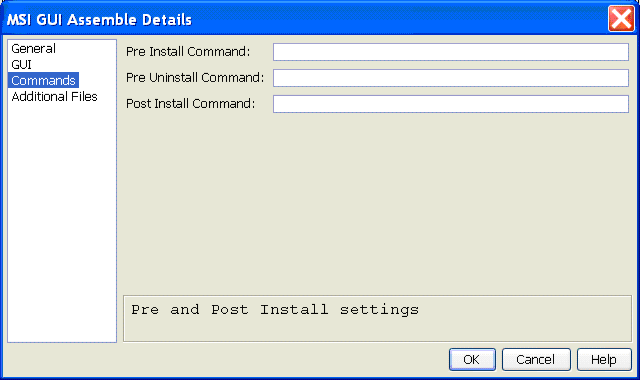
The fields in this dialog specify optional arbitrary commands to be executed as part of the MSI installation process. The commands are passed to a modal command window opened in addition to the MSI progress dialog. The command processor that is used is specified by the COMSPEC environment variable of the target host, set to cmd.exe. The command must return 0 to indicate success for the MSI to continue. Non-zero returns causes the installation to abort and leave the target host unmodified. The command window is closed when the command is executed. If the window must stay open until the user dismisses it, you can use a bat file that uses the pause command. All output to the command window is lost when the window closes. The execution start and exit value is recorded in a log file that is saved to the desktop of the user using the basename of the MSI file and the .log extension. The same log file is used if an optional DDL feature is installed on the target host. It is possible to change the behavior of these commands to hide the command window and automatically log stdout and stderr to the logfile. Edit the word show to hide on the appropriate line in Buildtool script bt\scripts\deploy_msi_gui.scr.
The Pre Install command is run before files are transferred. The command must therefore already exist on the target host. The current directory is the Windows system32 directory.
The Post Install command is run after the assembled files, including any Additional Files, have been transferred to the target. The current directory is the application install directory.
The Pre Uninstall command is run before any files are removed. The current directory is the application install directory.
|
Copyright © 2015 CA Technologies.
All rights reserved.
|
|