

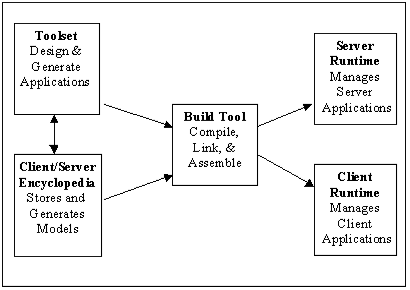
The following illustration describes the relationship of the Build Tool with other CA Gen tools. The Workstation Toolset and the Client-Server Encyclopedia contain code generators that create source code from your model. These source modules are presented to the Build Tool for compiling and linking. This makes your business application available for execution. Separate runtime environments for the client and the server manage the execution of your application.
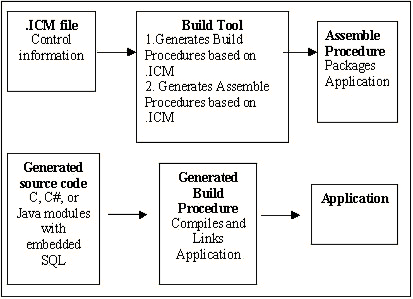
Construction creates a control file with an extension of ICM each time you generate a source code. The ICM file contains control information necessary to compile the source code and build it into an executable system. By reading the ICM, the Build Tool can generate a build procedure for the source code.
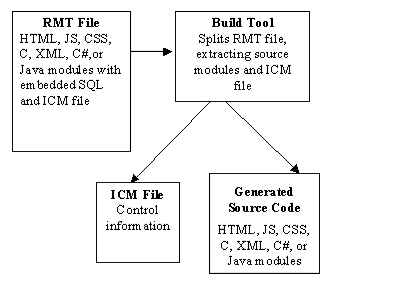
A special file called a Remote File (RMT) is created when the application is targeted to a machine other than the local machine. This is called a Remote Build as opposed to a Local Build. The RMT file contains the ICM file and all associated source files. This RMT file is transferred to the target system, where the Build Tool that is installed on the target system processes the RMT file and the ICM file. The following diagram illustrates the handling of the ICM file.
The Build Tool is a client server application and can compile and link applications that are either local or remote. In either case, the build process can be monitored and managed from the Build Tool client on the local machine, as shown in the following illustration.
|
Copyright © 2015 CA Technologies.
All rights reserved.
|
|