

When you select General from the MSI GUI or .NET Assemble Details panel, the following dialog appears:
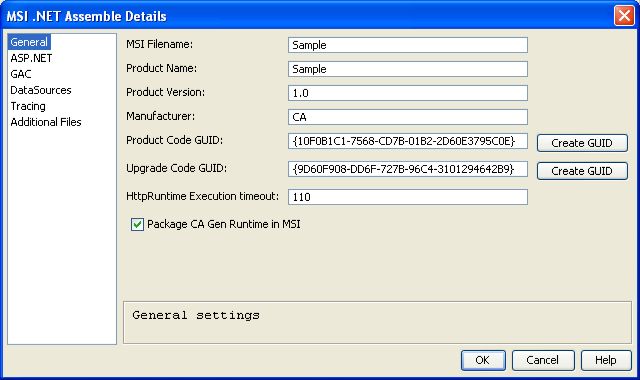
The fields in the General dialog are described in the following list:
Specifies the base name of the production MSI database file. The suffix .msi is appended automatically.
Specifies the name of the application visible to the end user. Also used as part of the default destination directory path.
Specifies the version of the product. Must be in the format ###.###.##### and is visible to the end user. This field and the two GUIDs are used by Microsoft MSI Installer to determine which files are copied from the media to the system during access, updates, upgrades, and revisions. For more information, see the MSI SDK documentation.
Specifies the manufacturer name. This is used as part of the default destination directory path and visible to the end user.
Specifies the Product Code GUID and Upgrade Code GUID. Click Create GUID to the right of the fields to populate the fields. You have the choice to enter a value or let one be calculated. Together with Product Version, these fields are used to control MSI behavior when installing newer software. It is important that these values only change when appropriate. For more information, see the Microsoft MSI SDK documentation.
Sets the value for the httpRuntimeExecutionTimeout attribute in the web.config file. For the specified number of seconds a browser lets an ASP.NET page run without responding. After the specified number of seconds, the operation is assumed to have failed, and the ASP.NET page is terminated. The default value for this attribute is 110 seconds. The range for httpRuntime executionTimeout is between 1 and 3600 seconds.
If checked, the CA Gen Runtimes are packaged into the MSI file.
|
Copyright © 2015 CA Technologies.
All rights reserved.
|
|