

To change the layout of the Module panel, choose either the Options icon or Tools, Options. This displays the Options dialog, which allows you to include or omit fields.
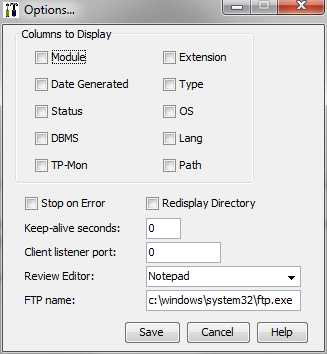
The description of the fields in the Options dialog are as follows:
Set of checkboxes that represent the columns that are displayed in the Module Panel.
Terminates ICM processing when a build error is encountered.
Restores the Module panel to the last known environment. The redisplay uses the last known Path, Extension, and Profile to determine which models to display.
Specifies the time in seconds for a thread to poll any remote host session at a specified interval. The values can range from 1-900 seconds. The default is zero seconds.
Specifies a single port or port range when you have a Firewall. If you specify _0 or leave the default, the Build Tool Client picks up an available port. If you specify a port number or range of ports, the Build Tool tries using these ports for the Client Side Listener.
Specifies the editor that is used for viewing output from builds. The options are:
Allows you to specify an FTP application to call when you click the File Transfer icon.
|
Copyright © 2015 CA Technologies.
All rights reserved.
|
|