

Adding a USE control action consists of the following activities:
Adding a USE action in the Action Diagram is one way to access view matching in the PAD. The other two ways are discussed in the following sections. You can match views after you add the USE action and either create a new action block to use or specify an existing one.
A process, Procedure Step, or action block calls other action blocks using the USE control action. When you invoke a USE action, you need to match the views of the called action block to the views of the calling Procedure Step or action block. The matching occurs in the Action Diagram of the calling (current) Procedure Step or action block.
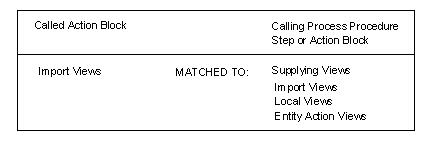
When you match import views, the import views of the called action block are listed with possible supplying views of the calling process, Procedure Step, or action block. The supplying views may be import views, entity action views, or local views. Work attributes cannot be matched to entity type attributes.
The following illustration summarizes import view matching:
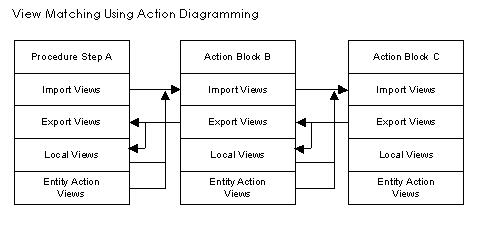
When you have matched the import and export views of the action block, the USE statement is complete. Matched views appear in the Action Diagram as shown in the following examples of USE statements:
USE find_space
WHICH IMPORTS: Group View product_information
WHICH EXPORTS: Entity View new_warehouse
USE dsgn_create_order
WHICH IMPORTS: Group View group_import
WHICH EXPORTS: Group View group_export
|
Copyright © 2014 CA.
All rights reserved.
|
|