

The ESCAPE action terminates the execution of a particular action group. ESCAPE is frequently used after exception conditions such as WHEN already exists and WHEN not found.
ESCAPE is just like the GOTO statement that appears in many languages, and has all the drawbacks of the GOTO, in that it can make your Action Diagrams difficult to read and debug.
The following example shows how ESCAPE terminates the READ of REQUIRED SUPPLIER and specifies which action group to process next:
This is an example of ESCAPE:
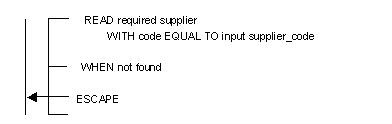
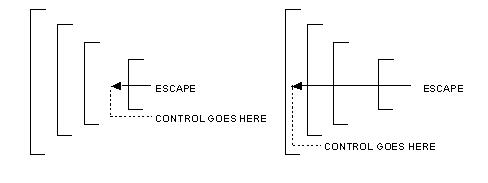
The head of the arrow in the ESCAPE shows which action group terminates and which action group gains control. The following diagram shows how you can specify control to other action groups with the ESCAPE action.
This is an example of ESCAPE Action Statement:
|
Copyright © 2014 CA.
All rights reserved.
|
|