

Using Views › Match Views › Guidelines for Matching Views
Guidelines for Matching Views
The following view matching guidelines are enforced.
- Match views between two entity views of the same entity type. This guideline also applies to work views.
- Match views between two group views with comparable structures. The two group views have comparable structures in the following cases:
- The entity views and group views that make up each group view to be matched correspond exactly in content and relative position.
- For repeating group views, the maximum cardinality of the receiving group view is greater than the maximum cardinality of the sending group view.
- For each component group view matched to its corresponding group view, the two group views look exactly alike except for the list of attribute views they contain.
- Match views between two group views when the cardinalities are compatible. That is, the receiving maximum cardinality of the view must be greater than or equal to the sending maximum cardinality of the view; otherwise, information is lost.
Note: Passing repeating group views can present a tremendous overhead compared with passing a single occurrence. The overhead can be reduced by exactly matching the attributes, cardinality, and the order of entity and work groups between the sending and receiving views.
- In USE and SET USING statements in the Action Diagram, match a single occurrence of a repeating group view to a non-repeating group view of comparable structure.
- When you match dialog flows, match export views of the source Procedure Step to import views of the target Procedure Step.
- When you match views in Action Diagrams:
- Match import views of the used action block to the import, local, or entity action views of the action block that USEs.
- Match export views of the USEd action block to the export or local views of the action block that USEs, or to export views marked as importable. Also, import views in the calling action block marked as exportable can be matched to USEd action block export views.
View matching causes the values of attribute views in the source view to be copied to the corresponding attribute views in the target view. Attribute views correspond when they implement the same attribute.
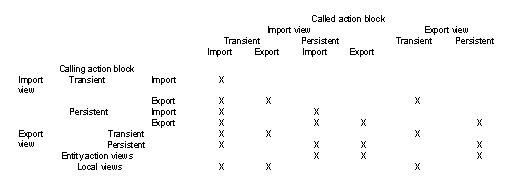
The table, View Matching Possibilities by Characteristic, indicates which views can be matched based on view characteristics.
The following diagram shows the View Matching Possibilities by Characteristic:
The Consistency Check facility checks matched views for conformance with the following rules:
- Matched entity views should have at least one attribute in common.
- Matched group views should have the same entity view structure.
- Matched views must have the same cardinality.
- No view matches are allowed under a repeating group view.
More information:
Creating Views
Copyright © 2014 CA.
All rights reserved.
|
|