

When you conduct procedure synthesis in the Dialog Design, the following activities occur automatically:
During procedure synthesis, the software generates a merged set of views for the Action Diagram of the procedure based on the combined views of all elementary processes you chose to implement in the procedure. The software synthesizes views based on the type of process-to-procedure implementation you invoke:
The most common implementation is one-to-one. Use one-to-many for alternative implementations of the same elementary process. Use many-to-one when multiple elementary processes have similar views that a common set of users require. Many-to-many is a combination of the one-to-many and many-to-one cases. The following illustration shows how views are synthesized when you invoke a many-to-one process-to-procedure implementation.
The following illustration is a View Synthesis for Many-to-One Process-to-Procedure Implementation:
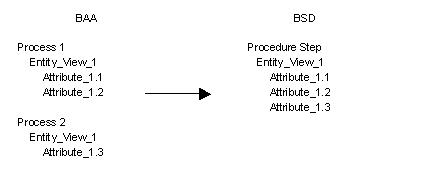
During procedure synthesis, the software copies the views and assigns new view names. The following table shows the default names assigned to entity and group views during view synthesis. The table includes names for additional view occurrences. This table illustrates the Default Names for Synthesized Views:
|
View Type |
Import View Subset |
Export View Subset |
|---|---|---|
|
Entity View |
IMPORT |
EXPORT |
|
EV–2nd Occurrence |
IMPORT_2 |
EXPORT_2 |
|
Group view |
GROUP_IMPORT |
GROUP_EXPORT |
|
GV–2nd Occurrence |
GROUP_IMPORT_2 |
GROUP_EXPORT_2 |
You can rename views and add names to the entity action views by accessing view maintenance in the Activity Hierarchy Diagram, Activity Dependency Diagram, or Action Diagram.
Note: Procedure synthesis leaves unchanged any default name you assign prior to transformation.
When you specify that a process containing two or more views of the same entity be implemented, the software renames the views with sequential numbers. The following table shows examples of renamed import and export entity view occurrences of EMPLOYEE. It also shows examples of renamed import and export group view occurrences of ORDER_LINE.
This table illustrates the View Naming examples:
|
Analysis |
Design |
|---|---|
|
Input_Employee New_Employee |
Import_Employee |
|
Output_Employee Old_Employee |
Import_Employee |
|
In–Group_Order_Line Input_Group_Order Line |
Import_Employee |
|
Out_Group_Order_Line Output_Group_Order_Line |
Import_Employee |
|
Copyright © 2014 CA.
All rights reserved.
|
|