

You can configure CA Gen ASP.NET Web Client applications to support ADO.NET access from the Build Tool.
Follow these steps:
Specifies the name of the database that the application must access (as defined in the CA Gen model.)
Specifies the data provider for a datasource. You can select the datasource from the available list of supported databases, or you can enter a custom datasource in the enterable drop down list.
Specifies the connection strings for the AD0.NET datasource. <Default> is applicable for the data providers that are available by default. If you specify a custom data provider, you must specify the connection string information for the data provider. You can also override the default connection strings settings for the supported data providers, and specify a custom connection string.
CA Gen constructs the default connection strings for the supported databases based on OPT.DBUSER, OPT.DBPSWD, and OPT.DBCONNECT profile tokens that are defined for the database in the Build Tool. CA Gen constructs the connection string information by default for the following supported data providers:
|
Data Provider |
Connection String |
Description |
|---|---|---|
|
System.Data.Odbc |
<Default> |
Default data provider for generated ODBC and JDBC code. |
|
IBM.Data.DB2 |
<Default> |
Default data provider for generated DB2 code. |
|
System.Data.SqlClient |
<Default> |
Default data provider for generated SqlServer code. |
|
Oracle.DataAccess.Client |
<Default> |
Default data provider for generated Oracle code |
The following screenshot illustrates the DataSources node on the MSI.NET Assemble Details dialog in the Build Tool:
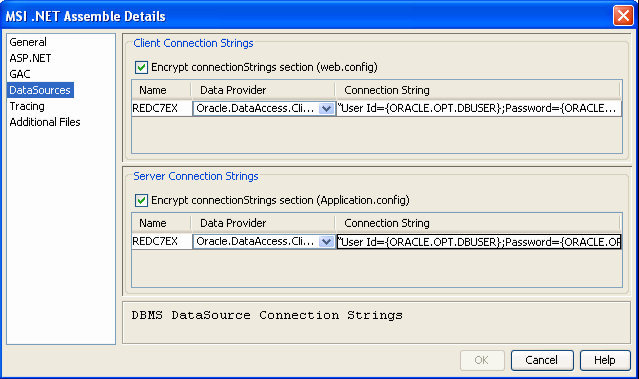
The DataSources node does not display if the ASP.NET Web Client application is not configured for database access.
Note: For more information about the MSI.NET Assemble Details Dialog, see the Build Tool Help.
|
Copyright © 2013 CA.
All rights reserved.
|
|