

A theme is a collection of appearance settings that you can define, and consistently apply across the application, and the application control types. You can apply a single theme across all the pages of CA Gen ASP.NET application. A theme for a CA Gen ASP.NET application consists of control skins, CSS files, and image files.
You can customize the appearance of ASP.NET applications by applying changes to the theme, without changing the appearance settings for individual windows, or controls in the application.
With the MSI .NET Assemble Details dialog in the Build Tool, you can specify the name of the theme, <themename>, for an ASP.NET application. The following image details the MSI.NET Assemble Details dialog in the Build Tool:
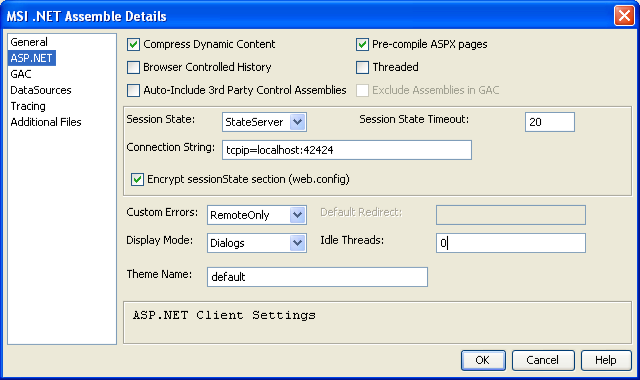
Note: For more information about the MSI.NET Assemble Details dialog, see the Build Tool Help.
When you specify a theme, CA Gen creates a directory, APP_Themes\<themename>, in the application root directory when installing the application on the server. This directory stores the control skin files, the CSS files, and the image files for each theme. User can create, add, and maintain control skins, CSS files, or image files for each theme in this directory.
The web.config file in the application root directory includes a pages tag with the theme attribute, <pages theme=”<themename>” />.
|
Copyright © 2013 CA.
All rights reserved.
|
|