

A custom layout defines one or more custom views based on COBOL or PL/I layouts. Use a custom layout to create one or more customized views of your file data based on one or more ordinary layouts. When you create a custom layout with multiple views, you define conditions for which each view is used. You can include and exclude fields to display, and you can specify which portion of each record should be mapped by your layout. A custom layout member can only be created using the Layout (Option 6) function. Use a custom layout in place of an ordinary layout almost anywhere that the use of layouts is supported.
You cannot use a custom in the following situations:
You can use custom layouts to accomplish the following tasks:
Custom layouts must reside in a partitioned data set with 80-byte records. They may coexist with your ordinary COBOL or PL/I record layouts; but custom record layouts are typically maintained in a separate partitioned data set defined in the Parm Files (Option 0.3) screen. The Layout Dataset always refers to the partitioned data set containing your custom layout definition. The Layout Member refers to the member name that contains the custom layout.
This process describes how to create and apply custom layouts using the ISPF interface.
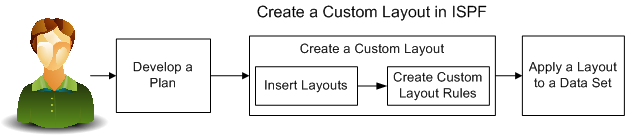
To create and apply a custom layout, complete the following steps:
|
Copyright © 2015 CA Technologies.
All rights reserved.
|
|