

|
|
|
At the asserting party, Federation Manager configured with the SiteMinder Connector can use SiteMinder for user authentication. After a successful authentication, the user must be redirected back to Federation Manager, which issues an assertion.
At the asserting party, SiteMinder authenticates a user and then issues an SMSESSION cookie. When the user is sent back to Federation Manager, the presence of the SMSESSION cookie triggers the creation of the FEDSESSION cookie. The deployment mode (proxy or standalone) is not relevant in this case.
Note: If Federation Manager is operating in standalone mode, Federation Manager and the SiteMinder Web Agent need to share the same cookie domain.
In a deployment with SiteMinder, the user has to visit SiteMinder first to authenticate. After authentication is successful, the web resource protected by SiteMinder must send the user back to Federation Manager. A deployment with the SiteMinder Connector is not the same as the Federation Manager feature called delegated authentication, which also allows a web access management system like SiteMinder to handle user authentication. What distinguishes delegated authentication from a SiteMinder Connector deployment without delegated authentication is that the user does not have to initiate authentication at SiteMinder.
Delegated authentication lets Federation Manager initiate an authentication request and then redirect the user to SiteMinder, enabling the redirect to occur automatically, assuming the feature is properly configured. To redirect the user back to Federation Manager after a successfully authenticating the user, the resource that SiteMinder protects must be configured with a mechanism to redirect the user back to Federation Manager. The redirect must include all data that the protected resource received. For example, if the SiteMinder-protected resource received several query parameters from the initial authentication request, it must redirect the user back to Federation Manager with these same query parameters.
The following figure shows an architecture using the SiteMinder Connector at the asserting party.
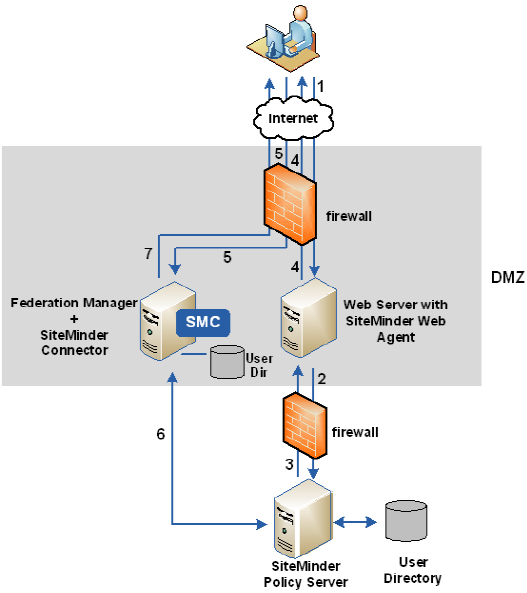
The previous figure shows the following communication flow at the asserting party:
| Copyright © 2010 CA. All rights reserved. | Email CA about this topic |