

|
|
|
Directory connections resolve how Federation Manager establishes a context for user identities. The asserting party determines which users it can create assertions for by authenticating each user against a user directory.
Multiple user directories in a federated environment often store the same type of user information, but each directory uses a different underlying schema and different user attribute names to identify the information. Therefore, Federation Manager receives a disparate view of the same user information. For example, an LDAP directory can use the attribute uid to represent a user name, whereas an ODBC directory can use the attribute name for the same information.
The purpose of user attribute mapping is to create a common view of the same information by defining a universal schema. The universal schema can resolve user information across multiple user directories. The system can reference user attributes without regard for the directory type, greatly reducing the number of configuration objects that are required for multiple user directories.
Each user attribute mapping is specific to the user directory in which it is defined.
After the connections to the user directories are configured, use one common name to reference the same information in different user directories.
The feature that you use to create a universal schema is called user attribute mapping. Configure this feature within the user directory configuration of the Federation Manager UI.
The following graphic shows the process for configuring user attribute mapping at the asserting party.
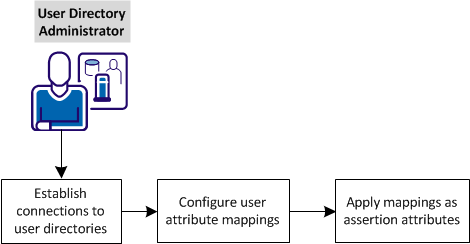
Complete the following tasks at the asserting party for user attribute mapping:
| Copyright © 2012 CA. All rights reserved. |
|