

As a web services administrator, you can configure and deploy the Web Services component. This component is a prerequisite for the Eclipse-Based UI. In addition, you can use Web Services to connect your user-written program to the CA Endevor SCM API.
The process of configuring and deploying Web Services on your z/OS system is performed in a UNIX System Services (USS) environment. During this process, you will complete the following objectives:
Note: Web Services requires a separate Tomcat instance that is configured for Web Services. Axis2/Java software is required to enable SOAP messaging.
Important: When you want to run Web Services under a new release of Tomcat or Axis2, we recommend that you create a new Web Services deployment in a new Tomcat directory tree. For more information, see How to Run Web Services Under a New Release of Tomcat.
The following graphic shows how to configure and deploy Web Services:
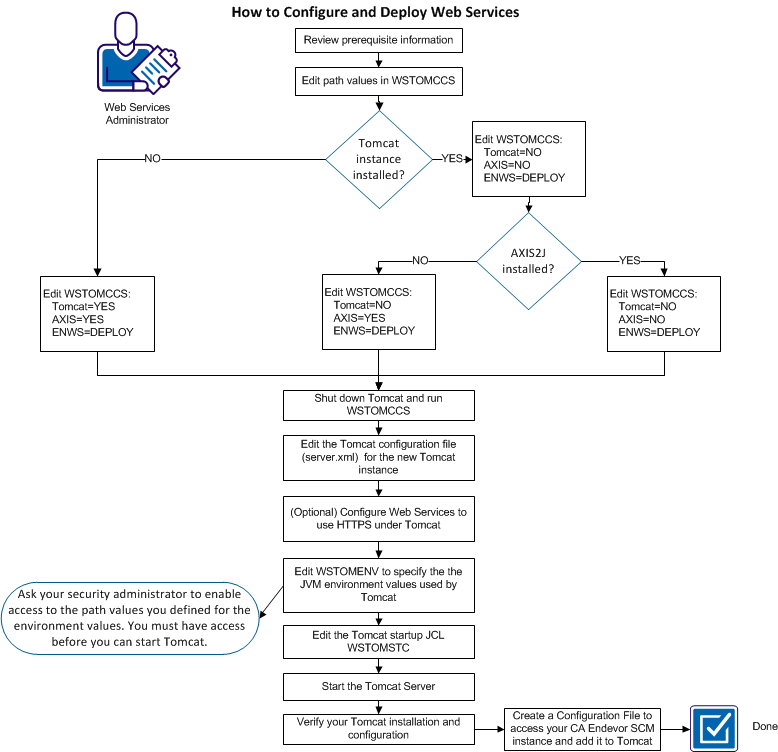
To enable Web Services, complete the following steps:
For more information about WSTOMCCS, see Create or Update a Tomcat directory structure for Web Services.
Note: You must inform your security administrator of the path values you define for the environment values. Your security administrator must enable access to these paths so that authorized users can use Web Services.
Note: You can create more than one configuration file, one for each CA Endevor SCM instance at your site.
Note: Completing these steps sets up Web Services to use the Eclipse Plug-in. For more information about client stubs, see User-Written Client Programs.
|
Copyright © 2013 CA.
All rights reserved.
|
|