

In addition to its inventory management, change control, configuration management, and release management facilities, CA Endevor SCM provides capabilities in the areas of parallel development management, software security management, and software information management. This broad range of product functionality is designed to support the entire software management lifecycle, not just one aspect.
CA Endevor SCM provides parallel development management capabilities through the CA Endevor SCM Parallel Development Option (PDM). Using this powerful development tool, it is possible to create a merged program from the comparison of a base program and two independently modified versions of that base program. By eliminating many of the time-consuming, manual tasks associated with merging parallel development updates, PDM saves time and reduces the margin for error.
PDM also provides a means of identifying and resolving conflicts before merging program updates. For this reason, PDM is a necessary tool for effectively managing concurrent application development and resolving problems which arise when integrating in-house modifications with vendor updates.
When several programmers work on the same module concurrently, there is always the danger that some modifications will be overridden by others or will be in direct conflict with one another. Beyond the basic frustration factor, this problem can have serious consequences from a control and maintenance standpoint.
Purchased software packages are typically customized to meet in-house demands. Unless those modifications are painstakingly documented, problems arise when an update arrives from the vendor. What exactly was changed in-house? And what modules did the vendor change, add, or delete? Manual methods for resolving these conflicts are time-consuming and error-prone, underlining the need for automated solutions for merging vendor updates with in-house modifications, and reconciling changes from release to release.
The following diagram provides a simple illustration of how PDM operates:
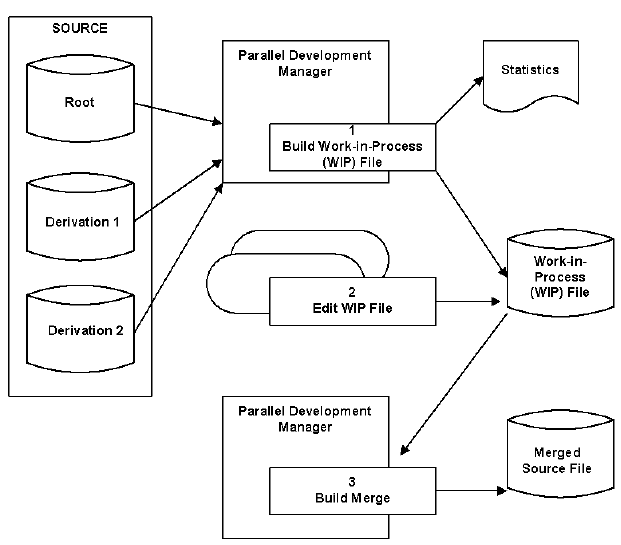
In Step 1, the Work-in-Process (WIP) file is created and statistics are reported. In Step 2, the WIP file is edited. In Step 3, the merged member is built.
The first step in using the Parallel Development Manager is to build a Work-in-Process (WIP) file. The WIP file is a PDS structure which combines three source files: the Root, Derivation 1, and Derivation 2. As an example, if PDM is being used to manage a vendor update, the Root would be the source for the old release, Derivation 1 would be the source for the in-house modifications made to that old release, and Derivation 2 would be the source for the vendor's new release.
As the source input files are being compared to produce a WIP File, statistics are generated. These statistics reveal critical information about the source comparison, such as the number of inserts and deletes per module, the percentage of the module that has changed, and the number of simultaneous (and potentially conflicting) updates.
With statistics in hand, it is now possible to view and edit the members which contain conflicts. At this point, you can decide which conflicts to resolve and how to resolve them.
Once you have viewed and edited the WIP file to your satisfaction, you can use PDM to automatically merge the WIP source into an output source library. This output source is then ready for compilation or, if applicable, introduction into CA Endevor SCM. The Parallel Development Manager can be used in both online and batch modes, and can operate on a member-by-member basis on a list of members, or on any portion of the CA Endevor SCM inventory.
Traditionally, inventory security has been provided at the physical file level but not at the individual element level. CA Endevor SCM security is based on its inventory structure, enabling security rules to be defined according to that structure, at the system, subsystem, type, and element levels. Additionally, CA Endevor SCM actions are secured, providing a means of restricting individuals to the appropriate change control functions at specific stages within the software development lifecycle.
CA Endevor SCM native security provides protection against unauthorized access and processing through three tables: Access Security, User Security, and Resource Security. The Access Security Table defines the environments to which each user has access. The User Security Table defines the systems/subsystems within a particular environment and the level of activity for which each user is permitted access (display only, delete, add, and so on). The Resource Security Table defines any element naming conventions that are restricted to a particular system/subsystem and the CA Endevor SCM actions for which the restriction applies. The use of CA Endevor SCM native security is optional and is enabled only if one or more of these tables are defined. When defined, access is permitted only through these tables.
In addition to native security, CA Endevor SCM provides the CA Endevor SCM Interface for External Security (CA Endevor SCM ESI). With CA Endevor SCM ESI, installations which currently use CA ACF2, CA Top Secret, or RACF security systems can secure access to CA Endevor SCM functions and data sets through those centralized systems rather than locally through CA Endevor SCM security tables. CA Endevor SCM ESI accomplishes this through an interface to IBM's System Authorization Facility (SAF). As illustrated in the following diagram, CA Endevor SCM ESI replaces standard CA Endevor SCM security tables with an SAF interface module:
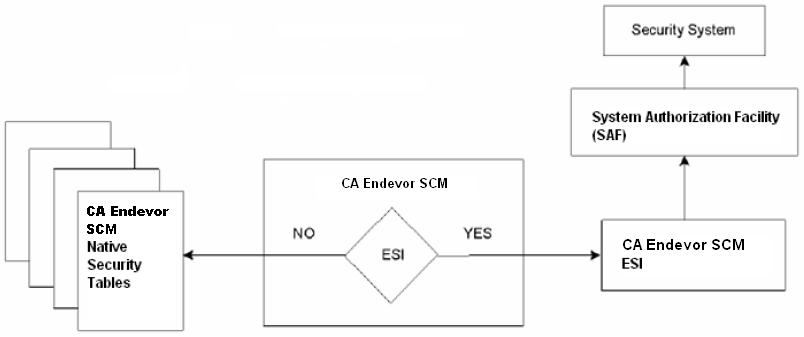
With CA Endevor SCM ESI in place, each security request is checked through the centralized security system in order to validate access to CA Endevor SCM environments, menu options, and actions against inventory elements.
Through a combination of its master inventory data base (Master Control File) and SMF log file, which notes every change attempted and completed, as well as security violation information, CA Endevor SCM provides extensive display and reporting facilities. The resulting information provides managers with an accurate and reliable means of performing workflow analysis, project tracking, trouble-shooting, and audit management.
CA Endevor SCM provides extensive display capabilities for viewing status and change information online. The following displays can also be printed in hardcopy format:
CA Endevor SCM provides four types of reports: Master Control File, Historical, Footprint, and Change Administration.
The following reports reflect the definitions of systems, subsystems, element types, and elements, as specified to the CA Endevor SCM Master Control File:
The following reports summarize security violations and element activity as recorded by CA Endevor SCM:
The following reports document footprint information placed in source and load modules by CA Endevor SCM:
The following reports document change package activity:
Based on advanced change control technology which is implemented through an automated, integrated approach, CA Endevor SCM yields a number of substantial benefits by doing the following:
|
Copyright © 2013 CA.
All rights reserved.
|
|