

Predefining CCIDs allows you to perform the following:
You can predefine CCIDs in one of the following ways:
This section contains information about CCID validation in CA Endevor SCM and about the CCID definition data set that you can define within CA Endevor SCM.
If you have predefined CCIDs, the CCID definition file is read into memory at CA Endevor SCM start-up. Any changes made to the definition file during a CA Endevor SCM work session do not take effect until you exit CA Endevor SCM and then re-enter the system.
CCID validation processing takes effect at the time an action is performed. That is, a batch action could be built (using the batch or package construction screens), but denied at execution time.
If the system you are working with is defined with CCID required, then a valid CCID must be specified for all actions requiring a CCID. If the system you are working with is not defined with CCID required, then the CCID will not be validated and any value including no CCID (spaces) for the action is allowed.
CCID validation applies only to specific actions. This processing is not applicable with the LIST or PRINT actions, because you cannot specify a CCID for these actions. In addition, CCID validation is not performed for the MERGE action.
Note: CCID validation performed by CA Endevor SCM can be used as a secondary validation mechanism that is invoked if a no match condition is found in the CA Endevor SCM InfoMan Interface. For more information, see the InfoMan Interface Administration Guide.
You can define and maintain CCIDs in a sequential file that you identify in the Defaults Table. This file is optional. It allows you to predefine CCIDs and associate each CCID, if you choose, with user IDs and/or CA Endevor SCM inventory areas.
When a CCID is specified in a CA Endevor SCM action, CA Endevor SCM validates that CCID against the contents of this data set. It determines whether or not the user is authorized to use the specified CCID in conjunction with the inventory area against which the action is being performed.
You must maintain the definition file using either the ISPF (or any other) text editor or by creating the file from your existing project management system. The definition file must be a card-image data set (80-byte, fixed-format records).
The format of the records in the CCID definition file is variable; the records may be comments ("comment lines") or definitions ("definition lines"). CCIDs are required on every definition line; optionally, a TSO user and/or CA Endevor SCM element identification information (environment, system, subsystem, element name, type, and stage) can be given.
To create a CCID definition data set
Note: When you create the sequential file, be sure to specify a data set name in the format: project.dataset.type, where type is a unique value. This causes the ISPF editor to use a unique profile for the data set.
SAMPCIPO is a sample CCID definition data set that is distributed with the CA Endevor SCM system. You can use SAMPCIPO to build a data set appropriate to the needs of your organization.
There are two reasons why a sequential data set is used for CCID definition:
Note: To assist in the building of the application program, an assembler macro has been supplied with the system. The macro can be found in the installation source library (iprfx.iqual.CSIQOPTN) built during Step 1 of the CA Endevor SCM installation process. The member name of the macro is $CIPOREC.
If you want to write a program to create a CCID definition data set, use the record layout specified in $CIPOREC, using your own data.
Setting up a CCID definition file as a sequential file allows you to use the ISPF text editor to edit the file, as follows.
First, enter the following primary commands:
TABS ON; CAPS ON; NULLS OFF
Second, set your tab positions as follows:

The CCID definition data set can be used for the following:
If a CCID gets a "no match" condition from the CA Endevor SCM InfoMan interface, CA Endevor SCM uses the CCID definition data set to check further. If the interface recognizes the CCID, then CA Endevor SCM bypasses the CCID check.
Using the CCID definition feature with this additional information can assist you in project management. You can create multiple lines in the CCID definition data set for each valid CCID. For a given CCID value, these successive lines specify either the users allowed to work under this CCID, the inventory items/areas which may be worked on, or both.
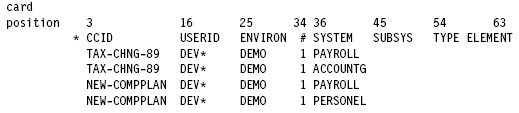
For example, assume that a site has two projects: TAX-CHNG-89 and NEW-COMPPLAN. Only people in the Development Department (TSO user IDs: DEVxxx) are allowed to perform changes as part of these projects. The inventory areas for the changes are as follows:
The CCID definition file would be coded as:
The following is a sample CCID definition data set.
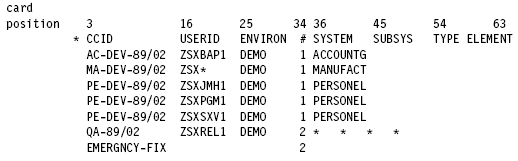
The following coding conventions apply to this data set:
A description of each field and its card position are shown in the data set that follows:
The name of the CCID. The name must be fully specified, defining a valid CCID. This value must be specified on every definition line. The same CCID may appear on multiple lines.
(Optional) If used, only the users whose user ID is specified (whether by full name or with the use of a name mask) may use the CCID indicated on this line.
(Optional) Environment name. If used, only elements in the environment specified (whether by full name or with the use of a name mask) can be updated under the CCID indicated on this line.
(Optional) Stage number. If used, only elements in the stage specified (either 1, 2, or *) can be updated under the CCID indicated on this line.
(Optional) System name. If used, only elements in the system specified (whether by full name or with the use of a name mask) can be updated under the CCID indicated on this line.
(Optional) Subsystem name. If used, only elements in the subsystem specified (whether by full name or with the use of a name mask) can be updated under the CCID indicated on this line.
(Optional) Element type. If used, only elements of the type specified (whether by full name or with the use of a name mask) can be updated under the CCID indicated on this line.
(Optional) Element name. If used, only elements whose names are specified (whether by full name or with the use of a name mask) can be updated under the CCID indicated on this line.
|
Copyright © 2013 CA.
All rights reserved.
|
|