

CA Endevor SCM is an integrated set of management tools used to automate, control, and monitor your application development process. You can use this software to perform the following activities:
CA Endevor SCM is implemented and run under z/OS, within the TSO ISPF environment, and in batch. Your site can also run an API program that interfaces with CA Endevor SCM.
This guide address the tasks of the CA Endevor SCM administrator. The following tasks are discussed in this guide.
To use the product, you need a working knowledge of the mainframe environment, the z/OS mainframe operating system, Time Sharing Option facility (TSO), and the Interactive System Productivity Facility (ISPF). It is also assumed that the product has been properly installed at your site.
This guide describes the tasks that administrators can perform in the ISPF environment. Foreground and many batch tasks can be performed using the ISPF panel driven interface. Batch JCL streams can also be written using the standard ISPF editor and submitted from TSO/ISPF.
For more information about writing batch JCL streams, see the SCL Reference Guide and the Packages Guide.
For information about installing and configuring the product, see the Installation Guide.
For more information about terms used in this guide, see the "Glossary" in the User Guide.
CA Endevor SCM allows you to automate and control the movement of software through your software lifecycle.
Software lifecycles are site-specific. A representative lifecycle might consist of five stages:
Note: This example illustrates one lifecycle. CA Endevor SCM can be implemented to adapt to any software lifecycle requirements.
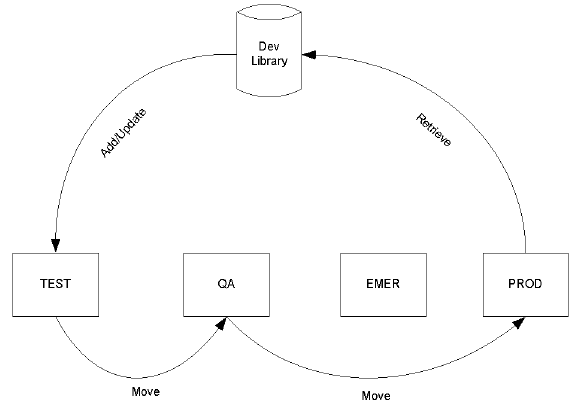
Normal change procedures include the following:
The following diagram shows normal change procedures in a software lifecycle:
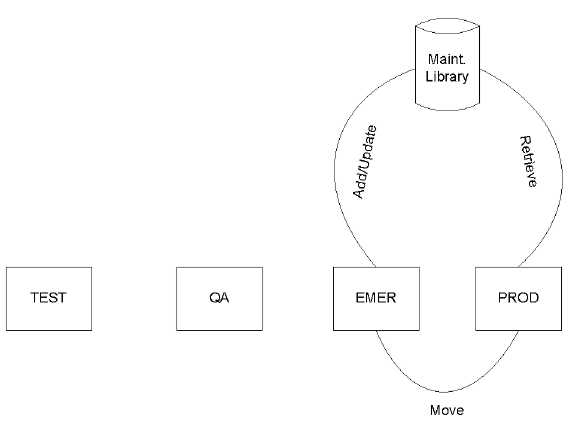
Emergency change procedures include the following:
The following diagram illustrates emergency change procedures in a software lifecycle:
|
Copyright © 2013 CA.
All rights reserved.
|
|