

CA Endevor SCM helps to manage the software lifecycle by providing a consistent and flexible logical structure for classifying software inventory. There are six components to this inventory structure: environments, stages, systems, subsystems, types, and elements. Environments, stages, systems, subsystems, and types are set up by the CA Endevor SCM administrator. Users act on elements. The following information defines these terms.
Functional areas within an organization. For example, there might be separate development and production environments. There is no limit to the number of environments that may be defined.
The stages in the software lifecycle. Each environment always has one or two stages. Each stage is assigned a unique name and ID, representing their place in the lifecycle. For example, TEST and an ID of 1, or QA and an ID of 2. Stages are referred to in this manual as Stage 1 (the first stage in an environment) and Stage 2 (the second stage in an environment). Stages can be linked together to establish unique promotion routes for program inventory within and between environments. These routes make up the map for a site.
The applications at a site. For example, there might be financial and manufacturing applications. A system must be defined to each environment in which it is used.
A specific application within a system. For example, there might be purchase order and accounts payable applications within the financial system. Keep in mind that:
Categories of source code. For example, you might create the following types:
You must define a type to each stage in which you want to use it.
Partitioned data set (PDS) members, CA Panvalet members, CA Librarian members, or sequential data sets that have been placed under control of CA Endevor SCM. By default, the element name is the member name. Each element is classified by system, subsystem, and type. Its environment and stage determine its location in the software lifecycle.
The CA Endevor SCM inventory structure allows you to do the following:
The CA Endevor SCM administrator builds an inventory structure based on the stages in your site's software lifecycle. There are six steps in setting up an inventory structure:
Software lifecycles are site-specific. For this example, consider a five-stage lifecycle:
DEV UNITTEST QA EMER PROD
You can decide to put some or all of the stages in your lifecycle under control of CA Endevor SCM. In this example, assume the last four stages of the lifecycle are under the control of CA Endevor SCM:
UNITTEST QA EMER PROD
This means that program development takes place outside of CA Endevor SCM.
While this is a fairly typical lifecycle, keep in mind that CA Endevor SCM can be adapted to any lifecycle.
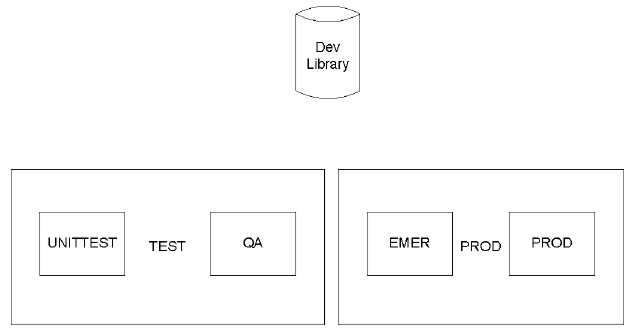
Environment is the CA Endevor SCM term for functional areas in your organization. In this example, assume that the UNITTEST and QA stages in the lifecycle are part of the development function, and that production applications and their maintenance are part of a function called production. The administrator defines environment TEST to include Stages UNITTEST and QA, and a second environment called PROD, that includes Stages EMER and PROD. Development activities take place in a development library, outside of CA Endevor SCM. This is illustrated by the following diagram:
The CA Endevor SCM administrator might decide to establish the following route (environment map) for inventory at this site that promotes inventory from Stage UNITTEST to Stage QA to Stage PROD, as illustrated in the following diagram:
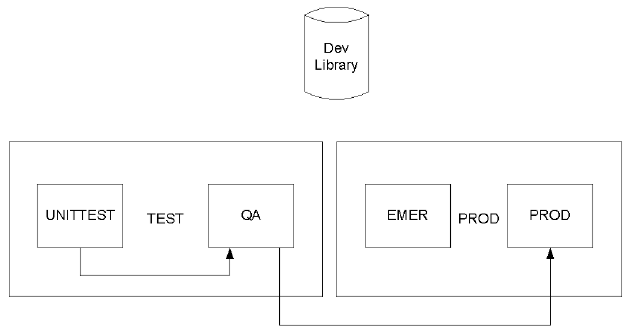
Emergency fixes would be moved from stage EMER to stage PROD.
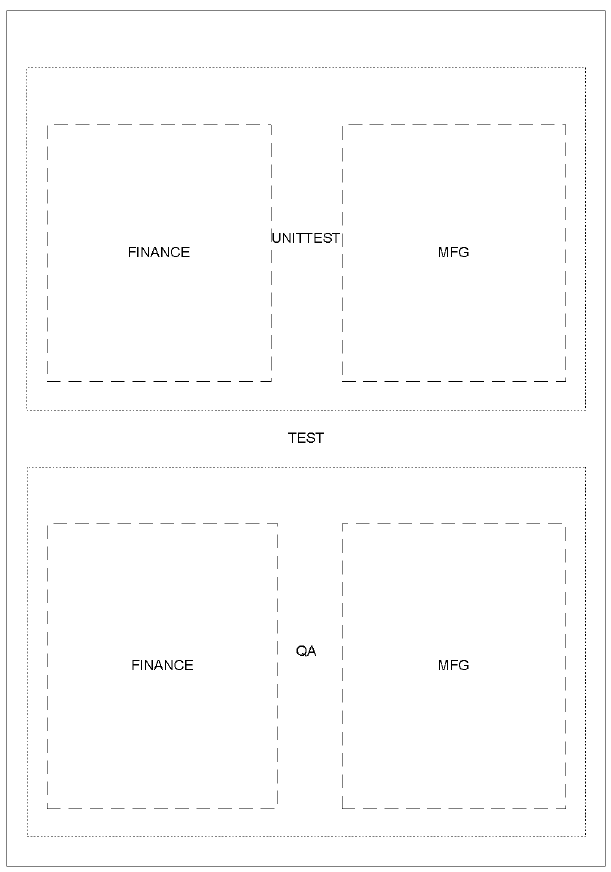
You must define a system to each environment in which you plan to use it. There are two systems in this example: FINANCE and MFG (manufacturing). This is illustrated by the following diagram:
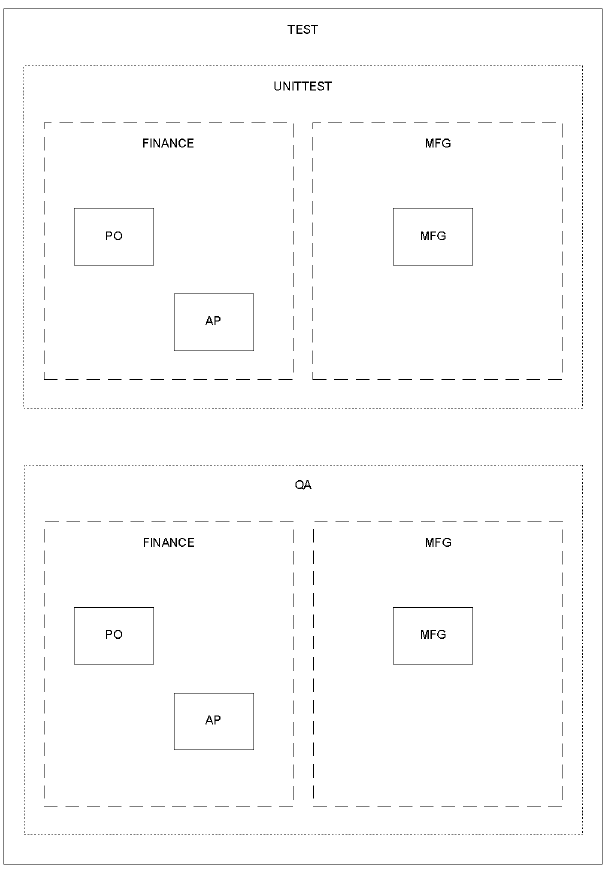
You must define at least one subsystem for each system. In this example, system FINANCE has two subsystems: PO and AP. System MFG one subsystem, MFG. This is illustrated by the following diagram:
You must define types to each system/stage combination in which you plan to use them. All subsystems defined to a system can use the types defined to that system. You must define types at each stage in an environment. In this example, system FINANCE has available the types, COBOL (COBOL code), JCL (JCL streams), and COPYBOOK (copybooks). System MFG has available the types, ASSEM (Assembler code), JCL, and MACRO (Macros). This is illustrated by the following diagram:
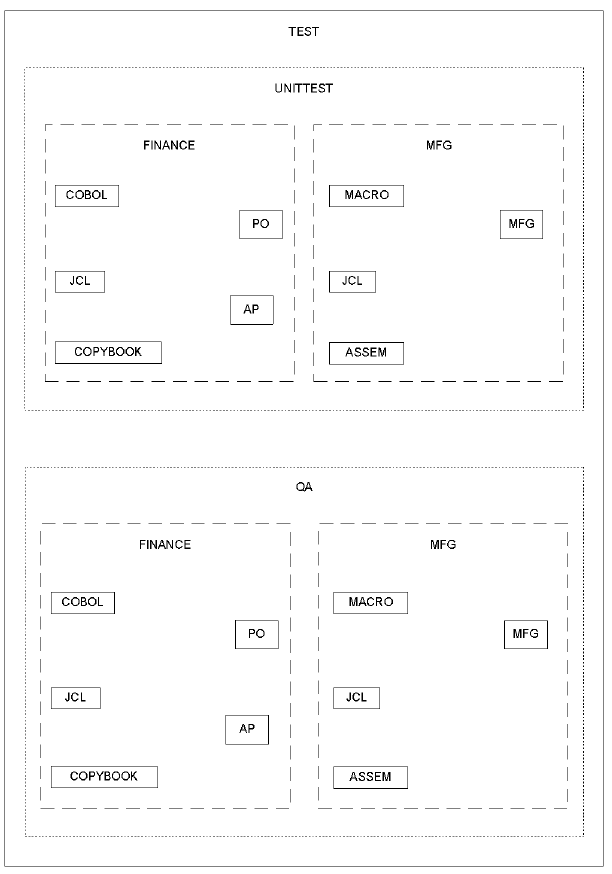
CA Endevor SCM classifies elements according to the inventory structure you set up. Each element is described uniquely in terms of its:
This is illustrated by the following diagram:
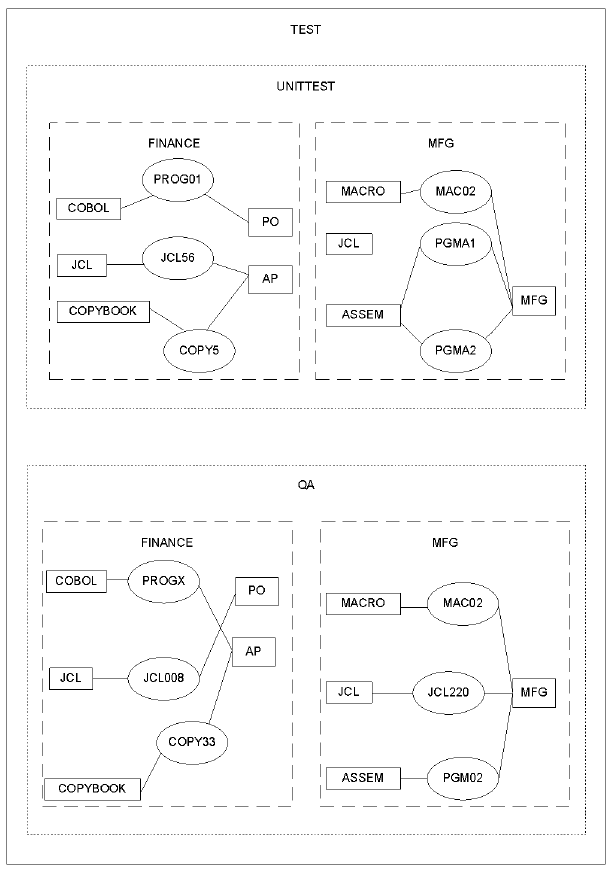
For example, in the previous diagram, elements are classified as follows:
|
Module |
Location |
Classification |
|---|---|---|
|
PROG01 |
Environment TEST Stage UNITTEST |
Type COBOL Subsystem PO System FINANCE |
|
JCL220 |
Environment TEST Stage QA |
Type JCL Subsystem MFG System MFG |
|
COPY33 |
Environment TEST Stage QA |
Type COPYBOOK Subsystem AP System FINANCE |
The CA Endevor SCM classification scheme allows users to produce lists of elements by environment, stage, system, subsystem, type, or any combination of these categories. For example, using the preceding example, you could query the system for the following lists:
|
Query |
Produces |
|---|---|
|
Show me all the JCL in the shop |
JCL56 JCL008 JCL22Q |
|
Show me all the software currently in QA |
PROGX JCL008 COPY33 PGM00 JCL22Q MAC02 |
|
Show me all the manufacturing software currently being unit tested |
PGMA1 PGMA2 MAC02 |
|
Copyright © 2013 CA.
All rights reserved.
|
|