

Select a model from your local computer or Mart to display in the left pane of the Resolve Differences dialog. The model in the left pane is compared with the database that you select in the right pane. The objects that you want to compare with the database depend on the comparison level that you select in the Type Selection pane.
Note: As this section describes how to compare a model with a database, it describes selecting a model for the left model. However, the left model can be a local or a Mart model, or it can be a model that is reverse-engineered from a database or a script. Further, you can switch the left and right models even after selecting the models.
Follow these steps:
Lets you open a model from your local computer. Click Load and browse for the file.
Lets you open a model from Mart. If you are not currently connected to a Mart, the Connect to Mart dialog appears.
When you work with a read-only model in the Resolve Differences dialog, you cannot change the model. Use this feature to perform a one-way compare.
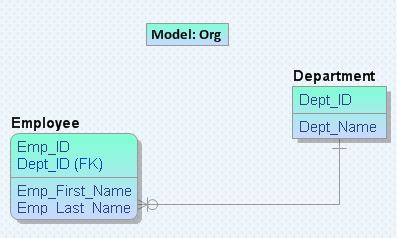
For example, consider Org.erwin for the left model as shown in the following diagram:
|
Copyright © [set copyright date variable] CA.
All rights reserved.
|
|
