

A User-Defined Property (UDP) is an example of a client expanding the CA ERwin DM metadata and involves creating and modifying objects on the metadata level. The structure of the UDP definition is similar to the definition of all native properties. The following diagram shows the metamodel objects involved when you define a UDP:
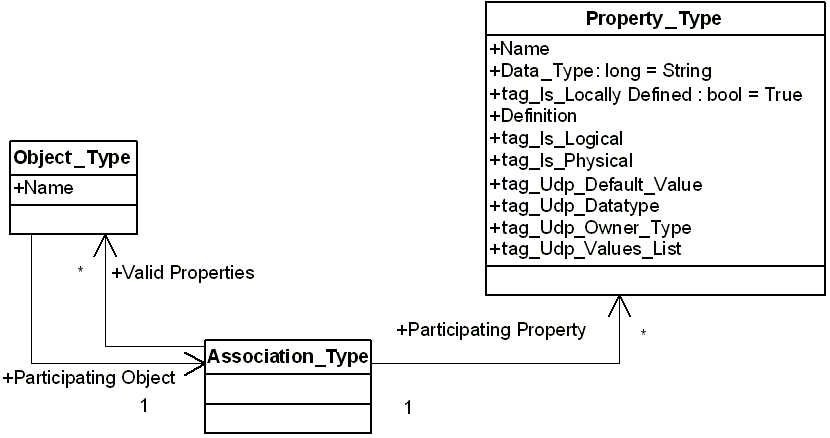
In this diagram an instance of the Property_Type object defines a UDP class, the Object_Type object defines an object class with which the UDP is associated, and the Association_Type object defines the association between object and property classes.
You are only required to create an instance of the Property_Type object to define a UDP. CA ERwin DM populates the rest of the necessary data. The following table describes the properties and tags of the Property_Type object:
|
Property or Tag Name |
Description |
Valid Arguments |
|---|---|---|
|
Name |
Property, UDP name |
CA ERwin DM upholds the following convention in naming UDPs to ensure their uniqueness. The convention is a three part name separated with dot (.) symbols: <ObjectClassName>.<Logical/Physical>.<Name> An example of this naming convention is: Model.Logical.My UDP The CA ERwin DM editors display only the last component. |
|
Data_Type |
Property, SCVT_BSTR |
The property is read-only and set by CA ERwin DM. All UDP values have a string datatype. |
|
tag_Is_Locally_Defined |
Property, TRUE |
The property is read-only and set to TRUE for all user-defined metadata. |
|
Definition |
Property, Optional |
Optional – Text that displays the UDP description. |
|
tag_Is_Logical |
Tag, TRUE or FALSE |
Optional – The tag has a TRUE value for UDPs used in logical modeling. |
|
tag_Is_Physical |
Tag, TRUE or FALSE |
Optional – The tag has a TRUE value for UDPs used in physical modeling. |
|
tag_Udp_Default_Value |
Tag |
Optional – A string with the UDP default value. |
|
tag_Udp_Data_Type |
Tag |
Defines the interpretation for the UDP value in the CA ERwin DM editors. The valid values are:
The property value can be:
Assumes the Text type if it is not specified. |
|
tag_Udp_Owner_Type |
Tag |
Required. Defines an object class to host instances of the UDPs.
|
|
tag_Udp_Values_List |
Tag |
String with comma-separated values. Only values from the list are valid values for a UDP. Valid only if the tag_Udp_Data_Type tag is set to List. |
Example 33
The following example illustrates how to use the API to define a UDP using Visual Basic .NET:
Public Sub Main()
    Dim oAPI As New SCAPI.Application
    Dim oPU As SCAPI.PersistenceUnit
    Dim oSession As SCAPI.Session

    ' Create a new model with all defaults
    oPU = oAPI.PersistenceUnits.Create(Nothing)

    ' Add a new session
    oSession = oAPI.Sessions.Add

    ' Start a session on the metadata level with the top (EMX) model set from the model
    oSession.Open(oPU, SCAPI.SC_SessionLevel.SCD_SL_M1)

    ' Start a transaction
    Dim TransId As Object
    TransId = oSession.BeginNamedTransaction("Create UDP")

    ' Create a new UDP definition
    Dim oUDP As SCAPI.ModelObject
    oUDP = oSession.ModelObjects.Add("Property Type")

    ' Populate properties
    oUDP.Properties("Name").Value = "Entity.Logical.My UDP"
    oUDP.Properties("Udp_Owner_Type").Value = "Entity"
    oUDP.Properties("IsLogical").Value = True
    oUDP.Properties("Udp_Datatype").Value = "Text"

    ' Commit changes
    oSession.CommitTransaction(TransId)

    ' Report the result
    Dim oProperty As SCAPI.ModelProperty

    Console.WriteLine(" --- Report the new User-Defined Property properties")
    For Each oProperty In oUDP.Properties
        Console.WriteLine(oProperty.ClassName + " '" + oProperty.FormatAsString + "'")
    Next

    Console.WriteLine(" Press Entry to exit ")
    Console.Read()
    ' Release the session
    oSession.Close()
    oSession = Nothing
    oAPI.Sessions.Clear()

    ' Save to the file
    oPU.Save("w:\UDP.erwin", "OVF=Yes")

End Sub
|
Copyright © 2013 CA.
All rights reserved.
|
|