

|
|
|
CA ERwin Data Model Validator provides diagnostic messages and suggestions to optimize your database operating efficiency.
The following categories can be diagnosed:
A corresponding severity level is assigned:
You can begin to analyze a model after you open it. In the example that follows, we use the model DEMO.erwin.
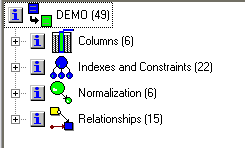
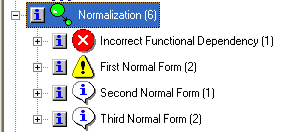
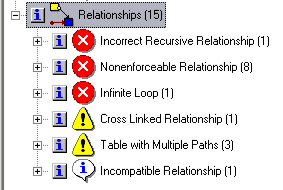
The numbers represent the amount of messages that were found for each category.
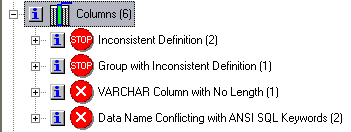
The numbers represent the amount of messages that were found for each category.
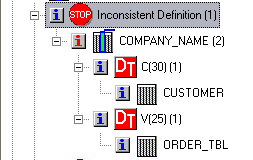
You can see that COMPANY_NAME has 2 inconsistent definitions. In table ORDER_TBL it is defined as Varchar(25). In table CUSTOMER it is defined as Char(30).
CA ERwin DMV shows that the attribute COMPANY_NAME exists in two different tables with different data types and that this must be avoided.
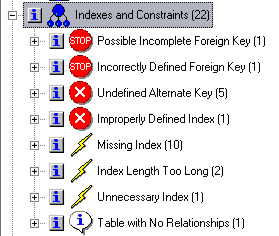
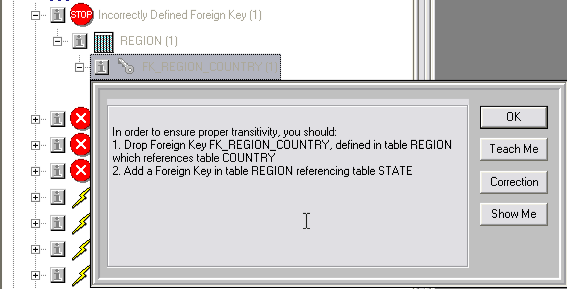
You can see that the Foreign Key FK_REGION_COUNTRY is not defined correctly. CA ERwin DMV suggests dropping this FK and adding another FK in table REGION referencing table STATE.
The Column UNIT_PRICE occurs as a second normal form deviation in table ORDER_ITEM. CA ERwin DMV warns that redundancy must be controlled.
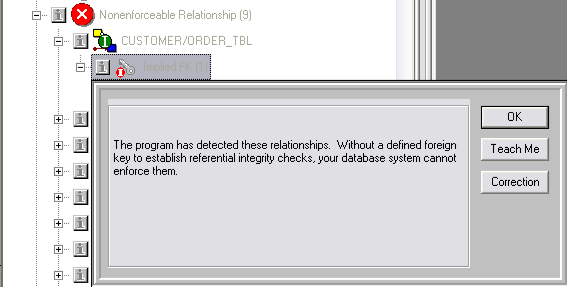
 for the Implied FK in the CUSTOMER/ORDER_TBL relationship.
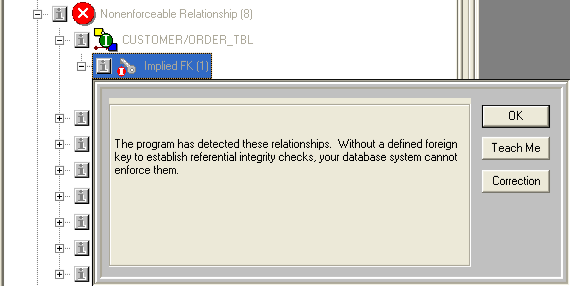
You are warned that there are eight instances of implied relationships that will not be enforced.
| Copyright © 2011 CA. All rights reserved. | Tell Technical Publications how we can improve this information |