

This section of the Release Notes for CA ERwin Data Modeler documents new features and enhancements from CA ERwin Data Modeler 8.2 onward.
This section contains the following topics:
Merge Alter Table Statements for DB2 LUW
Metadata Integration Bridges Updated
Publishing CA ERwin Data Modeler Models to a Web Portal
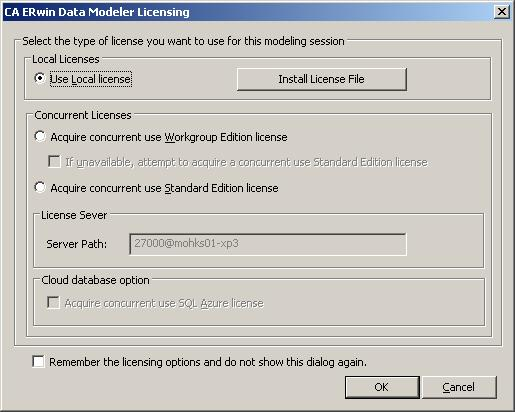
When you launch CA ERwin Data Modeler for the first time, you open the Licensing dialog and install the license file. If you are using concurrent licenses, you provide the path to the License Server on the CA ERwin Data Modeler Licensing dialog. In the previous release, you opened CA ERwin DM and then the Licensing dialog to install your license. Now you can install your license and can add the server path to the License Server from the CA ERwin Data Modeler Licensing dialog, before the application opens.
The following image shows the updated dialog:
|
Copyright © 2013 CA.
All rights reserved.
|
|