

The syntax of the RECOVER command is:
RECOVER
TOVOLUME=,POOL=,DISP=,NEWHLQ=,SCRATCH,CREATE,PDSECONV,ERASE,NOLOAD,AIX=,TOCAT=,
EXPORTF=,DEFALIAS=,DATACLAS=MGMTCLAS=,STORCLAS=,REPORT,CATGDGBASE,CATTAPEDS,
CATALIAS,GDGLIMIT=
By default, the recovery of data set(s) is to the volume(s) from which the data set(s) were backed up or archived. This parameter allows for an alternate target volume to be used. A maximum of one explicit entry is supported.
This parameter can be used to specify the name of a DASD Pool (a list of target volumes) that RECOVER can select from. This parameter is limited to only non-VSAM data sets, and is mutually exclusive with the TOVOLUME= parameter. For information on how to setup DASD Pool support, see the sysparm description of DFLTPOOLxxxxxxxx and the PARMLIB description of DASDPOOL in DASD Pool List in the Systems Guide.
This parameter indicates to CA Disk what should be the final catalog disposition of the restored non-VSAM data set(s). VSAM data sets will always be cataloged after restore, regardless of the value specified for this parameter. Three values are supported:
This is the default value, and will cause all recovered data sets to be cataloged. If a recovered data set is already cataloged, the existing catalog entry is left unaltered.
This non-VSAM only value prevents RECOVER from cataloging any data sets to the target volume.
This non-VSAM only value forces RECOVER to catalog the data sets to the target volume. This value will force the recatalog of existing data sets by the same name to the target volume as well. For more information, see the sysparm description of RESCRCATn in the Systems Guide.
This parameter forces a rename of all recovered data sets. Each data set recovered will have High Level Qualifier 2 (node 2) changed to the value of this parameter. This parameter can be used in conjunction with NEWHLQ (node 1). See MSG 4485 for errors in using this parameter; the data set may be ineligible or too long.Please be aware that when selecting multiple data sets, the outcome of a FMS Recover using NEWHLQ and/or NEWHLQ2 can be adversely affected. When using other than the defaults settings for sysparms like PREALLOC, RECCHCAT, RESCRCAT or VSPREDEF, as well as a command parm like SCR, special care must be taken in order to ensure that the new data set names do not duplicate each other during the recover operation. Executing the FMS Recover in simulate mode and review of the report output can help identify any duplication.
Indicates that if the current data set being processed already exists on the target volume, scratch it prior to recovery. For more information, see the sysparm description of RESCRCATn in the Systems Guide.
This parameter causes CA Disk to set the creation date in the Format-1 DSCB for each recovered data set to the current date. Default processing leaves the original creation date unaltered.
This parameter causes CA Disk to recover a PDSE as a PDS. To do so, you must specify PDSECONV and TOVOLUME= on the RECOVER command, and set sysparm SMSALLOC to 'N' to not supply the original DFSMS class names during allocation. For more details, see the sysparm description for SMSALLOCn in the Systems Guide.
When recovering a PO data set to a preallocated PO, the presence of this parameter erases the contents of the target data set with the restored version. If ERASE is not specified when recovering to an existing PO, sufficient space must be available for RECOVER to merge the restored members into the data set.
For more information, see the sysparm description for PREALLOCn in the Systems Guide.
This parameter causes CA Disk to allocate or define the data sets, clusters, or catalogs being recovered onto the target volume, but not load any of their records.
Note: This parameter has no effect on catalog recovery if any of the CAT options (See CATALIAS for more information) is also specified. This means that the command RECOVER NOLOAD, CATALIAS will recover all ALIAS entries.
This parameter indicates how alternate indexes are to be processed for the clusters being recovered. Three values are supported:
This is the default value, and will cause all clusters being recovered to have their associated alternate indexes defined and rebuilt.
Causes all clusters to have any associated alternate indexes defined, but not rebuilt. This parameter can be abbreviated DEF.
Causes all clusters that have associated alternate indexes to not be defined or rebuilt. This parameter can be abbreviated NO.
Specifies the catalog where the recovered cluster should be defined. It applies to VSAM only, and overrides the catalog selected by normal catalog management facilities.
Indicates whether or not CA Disk should recover ICF catalogs. Two values are supported:
This is the default value, and recovers (IMPORT) ICF catalogs directly (that is, recreates the catalog).
This option causes CA Disk to create a sequential file in Export-Temp format, allowing you to execute the IMPORT function as a separate job. For more information, see the sysparm descriptions for CATBKNAM, CATBKSPC, and CATBKUNT, in the Systems Guide.
Note: Using EXPORTF is not the only way to recover a catalog. A catalog can be recovered with any RECOVER command, providing the command doesn't specify NOLOAD, CATGDGBASE, CATTAPEDS, or CATALIAS.
Indicates whether CA Disk should redefine alias entries into the master catalog. Two values are supported:
This is the default value, and causes alias entries for the catalog being recovered to be redefined into the master catalog.
Prevents the alias entries from being redefined.
Note: This parameter is ignored when EXPORTF=YES is specified.
For VSAM or non-VSAM SMS-managed data sets, provide a new Data Class name to be assigned to the data sets during allocation. The Data Class name must have been previously defined to SMS.
This parameter is only valid when the system parameter SMSALLOC is specified with a value of "Y".
Note: This parameter cannot be used with DEFER.
For more information pertaining to the RESTORE command, see DATACLAS=.
For VSAM or non-VSAM SMS-managed data sets, provide a new Management Class name to be assigned to the data sets during allocation. The Management Class name must have been previously defined to SMS.
This parameter is only valid when the system parameter SMSALLOC is specified with a value of Y.
Note: This parameter cannot be used with DEFER.
For more information pertaining to the RESTORE command, see MGMTCLAS=.
For VSAM or non-VSAM SMS-managed data sets, provide a new Storage Class name to be assigned to the data sets during allocation. Non SMS-managed data sets can become SMS-managed by specifying this parameter. The Storage Class name must have been previously defined to SMS.
This parameter is only valid when the system parameter SMSALLOC is specified with a value of Y.
Note: This parameter cannot be used with DEFER.
For more information pertaining to the RESTORE command, see STORCLAS=.
Specify the number of generations of GDGs to be recovered. This parameter is not required for CA Disk to recover generation data sets. Cataloged rolled-off generations are not counted as part of the limit since they are no longer part of the sphere and they are always recovered.
Note: This parameter only applies to FMS RECOVER
The purpose of this parameter is to assist you in knowing in advance what resources are required if the application selected needs to be recovered.
Note: This parameter is only valid when simulating an FMS RECOVER.
The volume serial number of the device to which the CA Disk DSS data mover backed up data set is to be restored. This parameter is mutually exclusive with VOL= or TOVOL=parameters.
Notes: for the parameter
When specified, three reports are generated:
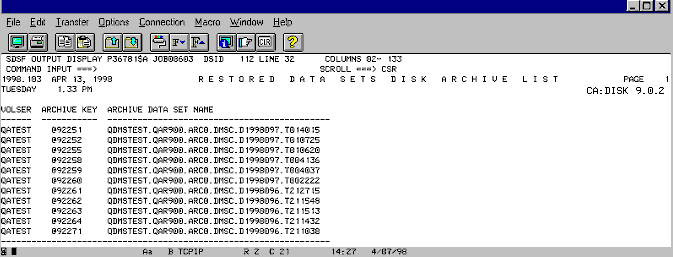
This report generates a list of Archive disk keys that would be required if you decide to execute RECOVER in LIVE mode. A sample of this report is illustrated as follows:
This report generates a list of Archive tape and cartridge keys. The content is controlled by sysparm RESCOPYT, described in RESCOPYTn in the Systems Guide. With RESCOPYT set to 'N', all enabled primary keys associated with the data sets scheduled for recovery is displayed. Also listed are any secondary keys for disabled primaries.
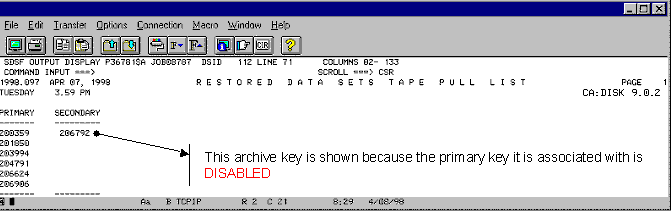
With RESCOPYT set to Y, only enabled secondary keys will be displayed.
Important! Using this setting can result in a subset of your data being recovered. For example, data that would normally be recovered using primary keys (RESCOPTYN) will not be recovered if the primary key does not have a secondary. Instead, you will receive message 0097 for each data set as shown in the following section:
The two data sets in the previous illustration failed because RESCOPYT was set to Y, and the primary keys they reside on do not have a secondary key.
This report generates a summary of all data sets that will be recovered, along with the resources that will be required if you decide to execute RECOVER in LIVE mode.
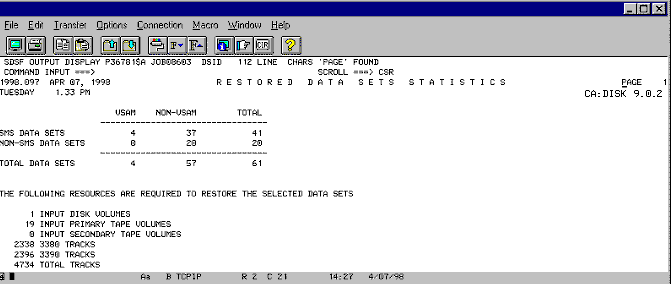
Note: The values specified for sysparms ALLOCPRI and PRIALLOC affect some of the information displayed in this report. Specifically, the total number of tracks will either increase or decrease, depending on the value specified for these sysparms.
The purpose of this parameter is to assist you in recovering portions of ICF catalogs in disaster recovery situations. It recovers every alias defined in the catalog(s) that are specified on the FMS SELECT statement. For example, based on the information displayed in LISTCAT OF ICFCAT.USERAI, the following command will create a catalog at your disaster recovery site called ICFCAT.USERAI containing 208 alias entries:
SCAN DSNINDEX
SELECT CATALOGS=ICFCAT.USERAI
RECOVER TOVOL=vvvvvv,CATALIAS
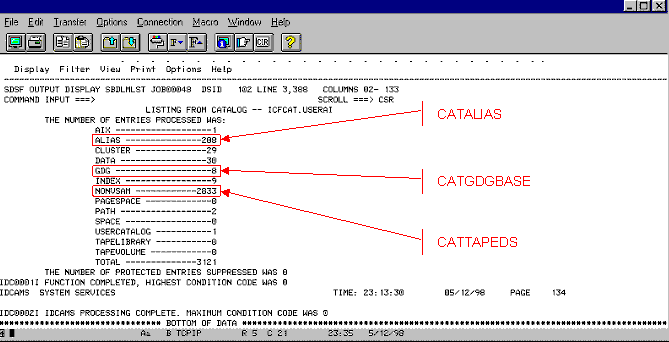
The previous illustration is a sample LISTCAT OF ICFCAT.USERAI panel. All other entries (for example, AIX, CLUSTER, DATA, and so on) will not be recovered. If your intention is to recover these entries as well, you must recover the entire catalog. For details, see EXPORTF=.
The purpose of this parameter is to assist you in recovering portions of ICF catalogs in disaster recovery situations. It recovers every GDG base catalog entry defined in the catalog(s) that are specified on the FMS SELECT statement. For example, based on the information displayed in LISTCAT OF ICFCAT.USERAI, the following command will create a catalog at your disaster recovery site called ICFCAT.USERAI containing 8 GDG bases:
SCAN DSNINDEX
   SELECT CATOLOGS=ICFCAT.USERAI
     RECOVER TOVOL=vvvvvv,CATGDGBASE
All other entries (for example, AIX, CLUSTER, DATA, and so on) will not be recovered. If your intention is to recover these entries as well, you must recover the entire catalog. For details, see EXPORTF=.
The purpose of this parameter is to assist you in recovering portions of ICF catalogs in disaster recovery situations. It recovers every tape data set entry defined in the catalog(s) that are specified on the FMS SELECT statement.
Note: Tape data set entries are simply non-VSAM data sets that reside on tape.
When this parameter is specified, CA Disk searches through the non-VSAM candidate entries looking for 80 in the DEVTYPE field. For example, the LISTCAT shown as follows attempts to distinguish non-VSAM tape data set entries from their disk counter parts:
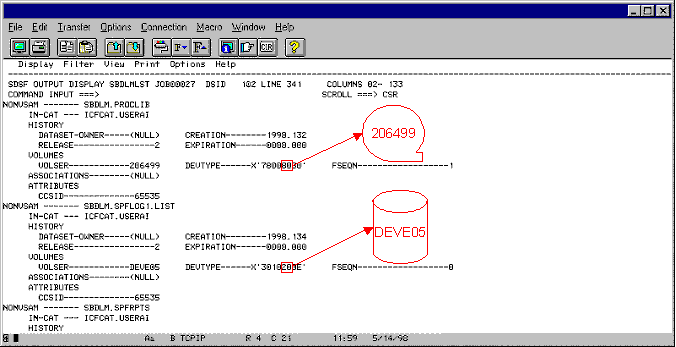
Only non-VSAM entries that contain '80' in their DEVTYPE field will be recovered. For example, based on the previous information, the following command will create a catalog at your disaster recovery site called ICFCAT.USERAI containing one tape data set entry:
SCAN DSNINDEX
   SELECT CATOLOGS=ICFCAT.USERAI
     RECOVER TOVOL=vvvvvv,CATTAPEDS
Note: In the previous LISTCAT, SPFLOG1.LIST would not be recovered because of the 20 in its DEVTYPE field.
All other entries (including all remaining non-VSAM entries) will not be recovered. If your intention is to recover these entries as well, you must recover the entire catalog. For details, see EXPORTF=.
|
Copyright © 2015 CA Technologies.
All rights reserved.
|
|