

The following questions and answers represent some of the typical concerns that need to be addressed in order to implement incremental backup.
How do I get an initial copy of all my data sets?
By using CA Disk to produce a full data set backup. Running does this:
//jobname JOB (acct,info),etc.
//STEP EXEC DMS
PASSWORD MASTER=the-CA Disk-master-password
SCAN REALVOLS
SELECT VTOCS
SELECT CATOLOGS
SELECT DSNAMES=/
BACKUP
How do I establish proper retention periods for the Archive/Backup volumes, and all of the data sets contained on those volumes?
First, recall how CA Disk for non-VSAM data sets, assigns retention periods. As each data set is copied to the archives (on tape or disk), an expiration date is assigned to its index entry. The value of the expiration date is determined as follows: A default expiration date is calculated using the default retention period value of sysparm RETRETPD, or from the RETPD or EXPDT parameter if it is present on the BACKUP command.
In addition to each archived copy of a data set being assigned its own retention period, the containing archive volume (the tape, or a sequential data set on disk) is also assigned an expiration date. CA Disk default processing assigns the never scratch Julian date of "99365" to each of the archive volumes. This ensures that they will not be written over until all contained archived data sets have expired. The DSNDELETE function of index maintenance will return tape volumes to scratch status (and delete backup or archive data sets kept on disk) when it determines that all contained data sets have indeed expired.
For important information, see the user exit description for TMSCTLEX-Tape Management System Control Interface Exit in the Systems Guide.
You can assign an alternate expiration date for archive volumes that are dynamically allocated by specifying sysparm DYNEXPDT with either an expiration date or retention period value. You can also provide the //ARCHIVE0 or //ARCHIVEC dd statement in your JCL. The value you specify for the RETPD or EXPDT parameter will be assigned to the archive volume.
For more information, see the section Year 2000 Considerations in the chapter "General Information."
With this in mind, it is appropriate to decide what the default retention period should be — 15, 30, or however many days.
Since non-SMS incremental backup creates a new copy only when a data set is modified, and assigns only that copy an expiration date, how can I protect that copy from expiring — and thus being dropped from the archives — if the data set is not modified again sometime within the retention period of the prior copy?
(For example, a read-only data set will never have new backup copies generated after its initial backup if backup uses only the change bit selection criteria.)
One technique is to coordinate the retention period assigned to each archived data set with the frequency with which you take full volume backups.
For example, assume we want to ensure that there will always be one backup copy of every data set, and full volume backups should be done only once a week. This can be accomplished by taking a full volume backup one day each week and incremental backup runs every intervening day. Both the full volume backup and the incremental backup runs should specify RETPD=8 on the BACKUP command. The incremental backup run should also specify MODIFIED,EQ,YES on the SELECT command.
A second and more efficient technique can be used if the CA Disk SVC is being used to record the last modify date in the data set's VTOC entry at the same time the change bit is being turned on.
Using this technique, instead of doing full volume backups once a week (usually on the weekend), CA Disk will select and back up only those data sets that have NOT been modified during the seven-day cycle. This eliminates time wasted in taking redundant copies of data sets that have already been backed up because they changed during the week.
For example, on Monday through Saturday, back up only the data sets being changed (MODIFIED,EQ,YES). On Sunday, back up the changed ones, but also back up any data set NOT changed within the last seven days by using this statement:
MODIFIED,EQ,YES,OR,MODDT,LT,TODAY-7
To ensure that you always have at least one copy of every data set in the archives, set the RETPD value to 15 days. A data set changed (and backed up) on Monday won't be picked up again by the unmodified in seven days test until the second following Sunday.
What if I want to keep two backup copies in the archives?
For the previous example, simply specify RETPD=22 on the BACKUP commands.
In general, set the RETPD= parameter to (X+1) times the number of days between the runs that pick up the unmodified data sets, where X is the number of backup copies you want to ensure. Add 1 to the result to allow a day overlap.
For example, with monthly runs to pick up the unmodified data sets, and ensuring one copy, use RETPD=63 (that is, (2*31+1)). To ensure two copies, use RETPD=94 (that is, (3*31+1)).
Can you draw a picture to demonstrate this?
Consider the simple case of weekly runs to pick up the unmodified data sets, using RETPD=15 to ensure one copy of all data sets. In the two-week following illustration, C represents the creation of a tape and E its earliest possible expiration (the RETPD value).
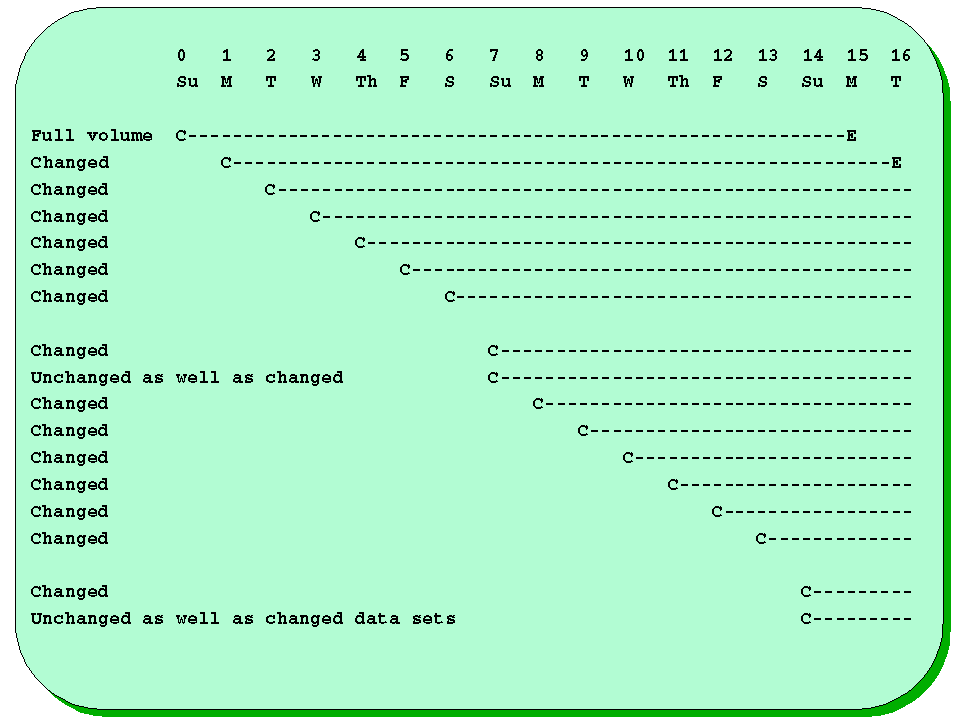
Notice that if a data set existed on Sunday (day 0) but is never modified, a new copy is generated each successive Sunday, before the previous tape (and version of the data set) has expired. If the data set is modified every day, each incremental backup tape will also contain a copy. At the end of the week, there can be from one to seven copies of the data set, but a minimum of one is ensured at all times. A data set modified on Monday (day 1) will not be backed up again until Sunday (day 14), but the prior copy is being kept until Tuesday (day 16), so one copy is guaranteed.
Also notice that running incremental backup on a daily basis is a somewhat arbitrary factor so far as it concerns the previous objective. Running it twice daily or only twice a week ensures the minimum copy goal as long as the RETPD= value is the same. But, most important, notice that full volume backups are never needed again!
How to archive MERGE and index maintenance fit into this scheme?
It depends on the characteristics of your data sets and the archive volumes that are created (be they tape or disk data sets). If all data sets backed up are assigned the same RETPD, the entire archive volume (for example, a tape) will expire at the end of the period. If each tape is also nearly completely filled, deleting the expired data sets is preferred because MERGE will accomplish very little. However, if the percentage of tape used in several cases is quite low, merging them can indeed be useful. See the chapter "MERGE" for a better understanding of this capability.
|
Copyright © 2015 CA Technologies.
All rights reserved.
|
|