

FMSGEN PROC › Sample Templates › FMSSAMP1
FMSSAMP1
This template, once customized to conform to site standards, can create multiple restore jobs.
The following illustration is a sample INSTALL Member —FMSSAMP1.
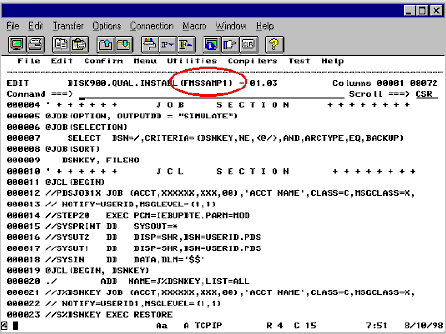
Notes: For Sample INSTALL Member:
- @JOB (OPTION, OUTPUTDD—This statement controls what type of output is desired.
- The presence of SIMULATE causes a simulation of any selection criteria specified. This would be the equivalent (meaning the end result would be the same) of executing FMS in simulate mode with one big difference—the FMSGEN job splits the selection criteria into separate restore jobs, one job per ARCHVOL. For an illustration of this, see FMSSAMP1.
- Another OUTPUTDD option available is INTRDR—The presence of this option immediately executes the JCL SECTION of the template.
- @JOB (SELECTION)—FMS criteria field names.
- These are the standard field names described in the section FMS Selection Criteria Field Names in the chapter "Basic System – FMS PROC."
- @JOB (SORT)—This is where you define the sort options and control break information.
- @JCL (BEGIN)—JCL statements to execute when INTRDR is supplied in the JOB SECTION.
The example shows IEBUPDTE control statements, but virtually any command statements can be coded here. By changing SIMULATE to INTRDR and supplying a dsname to SYSUT1 and SYSUT2, the IEBUPDTE control statements are invoked creating a member in the SYSUT2 data set for each ARCHVOL required to satisfy the selection criteria. For an illustration of this, see Sample IEBUPDTE output from FMSGEN.
Sample output from FMSSAMP1 is the result of 2 separate jobs (the first is FMS, the second is FMSGEN) using identical criteria. The criteria used was:
SELECT DSN=/,CRITERIA=(DSNKEY,NE,<@/>,AND,ARCTYPE,EQ,BACKUP)
The following illustration is a sample output from FMSSAMP1:
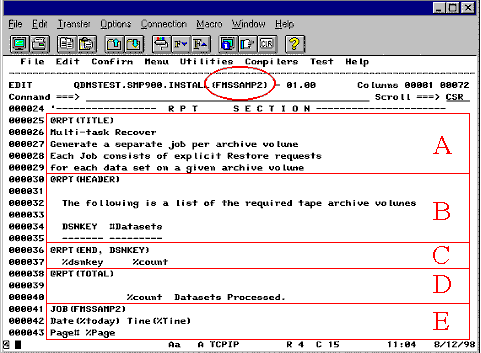
Notes:
- The top half of the SYSOUT is an FMS job, resulting in 1 tape drive being used for the duration. If you were to scroll down to the bottom, the criteria used here would total 196 data sets on 6 different ARCHVOLS.
- The identical selection criteria were used to create the bottom half with FMSGEN. It's important to realize that with FMSGEN, even though the same 196 data set s will be restored, it's a much more efficient process because the job is automatically split up by ARCHVOL. In this particular case, the 196 data set s will be restored by 6 different jobs executing concurrently.
Copyright © 2015 CA Technologies.
All rights reserved.
|
|