Previous Topic: Components of the Test Auto-Restore Hook InterfaceNext Topic: Installing the Test Auto-Restore Hook Interface


Preparing to Use the Test Auto-Restore Hook Interface

There are several things which you must do before you use the Test Auto-Restore Hook feature.

To prepare to use the Test Auto-Restore Hook feature
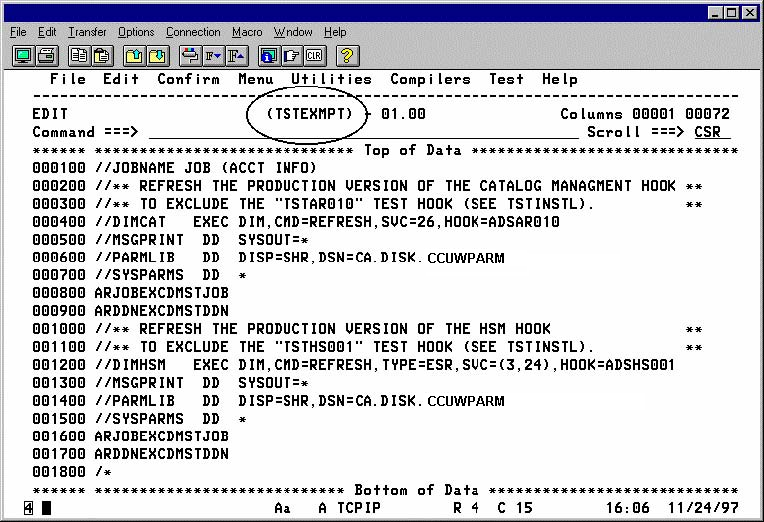
  1. Tailor the following jobs provided in the INSTALL or PROC libraries on your CA Disk distribution tape: TSTHOOKS, TSTINSTL, TSTREMOV, TSTSTATS, TSTEXMPT, and TSTAR. You need to tailor the job accounting, load library name (DD=STEPLIB), and the parameter library name (DD=PARMLIB).
  2. Tailor the Q= parameter in the TSTAR PROC. This parameter provides a data set name prefix for the CA Disk libraries in your system.
  3. You must select the job name, the DD statement, or both you want to have trigger the Test Auto-Restore feature. This is accomplished through the ARJOBEXC and ARDDNEXC system parameters. After selecting a job name, DD statement or both, supply these sysparms to the TSTEXMPT member in the form on a sysparm override as shown in the following illustration:

    Disk_Install_ENU_page 170

    When this job is executed, it refreshes the production Auto-Restore Hook to begin excluding the job/task name , the DD statement name or both based on the value specified for sysparms ARDDNEXC and ARJOBEXC.

    Important! The same values you specify for sysparms ARJOBEXC and ARDDNEXC in the TSTEXMPT job, must also be specified in the TSTINSTL job. Otherwise, unpredictable results occur.