

CA Disk sysparm overrides are controlled through use of the //SYSPARMS dd statement. Use of this dd statement is described in the Overriding Sysparms Instream section in the Systems Guide. Users can override sysparms only if SYSPARMO is specified with a value of Y in the SYSPARMS member of your CA Disk parmlib.
If you do not have a security package that is compatible with SAF, you cannot limit access to sysparm overrides for a subset of users, or for a subset of sysparms.
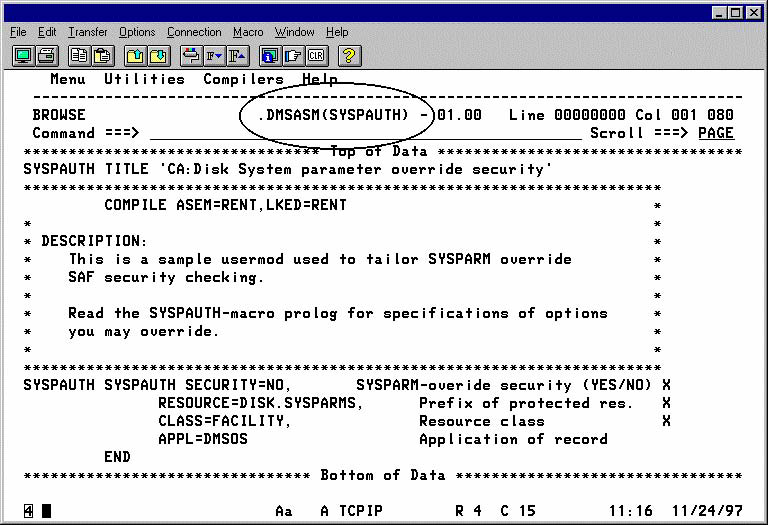
If your security package is SAF-compatible, and if you want to restrict your users to a subset of CA Disk sysparms that they can override, or restrict sysparm overrides to a certain group of users, you can activate the System Parameter Override Security Feature by installing user exit USERMOD5 according to the following procedure.
To activate the System Parameter Override Security Feature by installing user exit USERMOD5
SETROPTS CLASSACT(FACILITY) GENERIC(FACILITY) +
GENCMD(FACILITY)
When SYSPARMO is specified with a Y, CA Disk uses the FACILITY (IBMFAC if you have CA Top Secret) class of your security package to determine if the user has READ access to the resource DISK.SYSPARMS.sysparmname before allowing the override.
Note: The check for READ access is with the FACILITY (IBMFAC if you have CA Top Secret) class, not the DATA SET class. Therefore the name does not refer to the name of an actual data set; there could be other rules on the DATA SET class that refers to data sets with that same name. RACF users must execute this command before creating the following generic profile.
RDEFINE FACIITY DISK.SYSPARMS.* +
UACC(NONE) NOTIFY(security administrator)
Where security administrator is the userid of a person to whom optional violation messages are to be sent.
If you have CA ACF2, issue the command:
TSS ADDTO(deptacid) IBMFAC(DISK.SYSPARMS.*)
PERMIT DISK.SYSPARMS.* CLASS(FACILITY) +
ACCESS(READ) ID(storagemanagementgroup)
Where storagemanagementgroup is the group name (or list of userids) of your storage administrators.
TSS PERMIT(acid) IBMFAC(DISK.SYSPARMS.*) ACC(READ)
Where acid is the acid to whom you want to be able to use run-time sysparm overrides.
RDEFINE FACILITY DISK.SYSPARMS.sysparmname +
UACC(NONE) NOTIFY(securityadministrator)
PERMIT DISK.SYSPARMS.sysparmname CLASS(FACILITY) +
ACCESS(NONE) ID(storagemanagementgroup)
TSS ADDTO(depacid)IBMFAC(DISK.SYSPARMS.sysparmname)
TSS PERMIT(acid) BMFAC(DISK.SYSPARMS.sysparmname) +
ACC(READ)
Where acid is the acid to whom you want to be able to use run-time sysparm overrides.
RDEFINE FACILITY DISK.SYSPARMS.sysparmname +
UACC(READ) NOTIFY(securityadministrator)
TSS ADDTO(deptacid)IBMFAC(DISK.SYSPARMS.sysparmname)
RACROUTE REQUEST=AUTH,
RELATED='DMS/OS AUTH CHECK',
APPL='DMSOS ',
ATTR=READ,
CLASS='FACILITY',
ENTITY=DISK.SYSPARMS.sysparmname
Where sysparmname is the 8-character name of the system parameter. CA Disk issues a message and ignore overrides of those sysparms to which the user does not have sufficient authority.
Note: CA Top Secret translates this FACILITY class check to IBMFAC.
|
Copyright © 2015 CA Technologies.
All rights reserved.
|
|