

This field is a list of CA Disk functions that a user or user group is authorized to use. Function codes are seven characters and can be abbreviated to the first three characters. Commas, not by spaces, must separate functions. Up to 150 characters of functions can be specified using the continuation rules of CA Disk parmlib entries. The last function code is followed by a single quote.
The following is a list codes and their valid specifiable functions:
Indicates that all functions are to be assumed for this specification. In specifying the ALL function, all features are assumed. For any function that has not been licensed, subsequent use of the ISPF option to invoke it can result in abends looking for routines you do not have. If applicable, this value should be specified alone in field 3 of the statement.
ISPF Function: SPECIAL FUNCTION
Generate JCL for batch job submission.
ISPF Function: ARCHIVE/BACKUP - SUBMIT BATCH JOB TO ARCHIVE DATA SET
Generate JCL for batch job submission.
ISPF Function: ARCHIVE/BACKUP - QUEUE A REQUEST (VIA BATCH)
ISPF foreground function: allow user to enter a deferred archive command.
ISPF Function: ARCHIVE/BACKUP - QUEUE A REQUEST ONLINE
Generate JCL for batch job submission.
ISPF Function: RESTORE - QUEUE A REQUEST (VIA BATCH)
Generate JCL for batch job submission.
ISPF Function: RESTORE - SUBMIT BATCH JOB TO RESTORE DATA SETS
ISPF foreground function: allow user to enter a deferred restore command.
ISPF Function: RESTORE - QUEUE A REQUEST ONLINE
Invoke TSO RESTORE command.
ISPF Function: RESTORE - EXECUTE RESTORE REQUEST (VIA TSO)
ISPF foreground function: allow user to list entries only.
ISPF Function: LIST - ARCHIVE/BACKUP INDEX ENTRIES
ISPF foreground function: allow user to list and delete entries for archived data sets.
ISPF Function: LIST - (OR DELETE) ARCHIVE/BACKUP INDEX ENTRIES
ISPF foreground function: allow user to list and change expiration date values for archived data sets.
ISPF Function: LIST - (OR CHANGE) ARCHIVE/BACKUP INDEX ENTRIES
ISPF foreground function: allow user to list change expiration dates and delete entries for archived data sets. (If the delete function is requested for an index record associated with a RACF-protected data set for which a discrete profile has been saved, authorization of the ISPF session is required. This can be accomplished if you have a user SVC to obtain authorization, and indicate it to CA Disk by sysparm RADELSVC. If this cannot be provided, give your users the CDSINDX function instead of this one.)
ISPF Function: LIST - (DELETE OR CHANGE) ARCHIVE/BACKUP INDEX ENTRIES
ISPF foreground function: allow user to list deferred archive and restore requests previously entered.
ISPF Function: LIST - QUEUED ARCHIVE/RESTORE REQUESTS
ISPF foreground function: allow user to list and delete deferred archive and restore requests previously entered.
ISPF Function: LIST - (OR DELETE) QUEUED ARCHIVE/RESTORE REQUESTS
Generate JCL to invoke the Move/Copy function using the COPY command.
ISPF Function: MIGRATE - MOVE A SPECIFIC DATA SET TO A NEW VOLUME
Generate JCL to invoke the PDS Compress function for specific data sets.
ISPF Function: COMPRESS - COMPRESSA SPECIFIC PDS
Generate JCL to invoke the PDS Compress RELOAD function.
ISPF Function: COMPRESS - RESTART COMPRESS OF SPECIFIC PDS
Generate JCL to invoke the REPORT function.
ISPF Function: REPORTS - SCAN VTOCS: GENERATE FIXED FORMAT REPORTS
Generate JCL to invoke the implicit archive (RETAIN) function.
ISPF Function: ARCHIVE/BACKUP - SCAN VTOCS TO SELECT DATA SETS
Generate JCL to invoke the explicit VSAM (FIND) function to generate VSAM reports only.
ISPF Function: REPORTS - FIND SPECIFIC VSAM CLUSTER OR GROUP
Generate JCL to invoke the explicit VSAM (FIND) function.
ISPF Function: ARCHIVE/BACKUP - FIND SPECIFIC VSAM CLUSTER OR GROUP
Generate JCL to invoke the implicit VSAM function to generate VSAM reports only.
ISPF Function: REPORTS - SCAN CATALOGS TO SELECT VSAM CLUSTERS
Generate JCL to invoke the implicit VSAM function.
ISPF Function: ARCHIVE/BACKUP - SCAN CATALOGS TO SELECT VSAM CLUSTERS
Generate JCL to invoke the implicit recovery function.
ISPF Function: IMPLICIT RECOVERY - RESTORE DATA SETS FROM A VOLUME
Generate JCL to invoke the archive index maintenance procedure (IXMAINT).
ISPF Function: MAINTENANCE - DELETE EXPIRED ENTRIES IN ARCHIVE INDEX
Display information about CA Disk archive volumes in the foreground ISPF environment.
ISPF Function: LIST - ARCHIVE VOLUME INFORMATION
Invoke the interactive CA Disk tapepool management functions.
ISPF Function: MAINTENANCE - UPDATE ARCHIVE TAPE POOLS ONLINE
Generate JCL to invoke the idle space release function.
ISPF Function: RELEASE - SCAN VTOCS: RELEASE IDLE SPACE
Generate JCL to invoke the implicit Move function.
ISPF Function: MIGRATE - SCAN VTOCS: MOVE DATA SETS TO NEW VOLUMES
Generate JCL to invoke the implicit PDS Compress function.
ISPF Function: COMPRESS - SCAN VTOCS: COMPRESS ANY PDS IF ITS NEEDED
Generate JCL to restart the PDS Compress RELOAD function.
ISPF Function: COMPRESS - SCAN VTOCS: RESTART AFTER AN ERROR
Generate JCL to invoke the implicit sequential migration to tape function.
ISPF Function: MIGRATE - SCAN VTOCS: MOVE PS DATA SETS TO TAPE
When this option is selected it will display a panel that shows the names of the CA Disk data sets that will be used for CA Disk requests.
ISPF Function: MISCELLANEOUS - DISPLAY RELEASE, FILES, AND PARMLIB
This utility function causes CA Disk to check the syntax for any member of the CA Disk parmlib data set. This is normally used after a user has modified some member in parmlib.
ISPF Function: MISCELLANEOUS - SYNTAX CHECK A MEMBER OF PARMLIB
Generate online reports using the DSCL selection language. After defining a report online it can be produced either online or through a batch job.
ISPF Function: REPORTS - DEFINE YOUR OWN EXECUTE ONLINE (OPTIONAL)
Generate online hexadecimal dump of subfile records in the FILES.
ISPF Function: MISCELLANEOUS - DISPLAY FILES data set RECORD IN HEX
Generate JCL for batch job submission.
ISPF Function: GENERATE DSCL COMMANDS
Generate a REPORT command with the SPFRPTS parameter.
ISPF Function: REPORT USING SPFRPTS
Generate a REPORT command.
ISPF Function: REPORT USING DSCL
Generate a VBACKUP command.
ISPF Function: BACKUP A PHYSICAL VOLUME
Since there are more options available than menu lines on a screen, it is sometimes necessary for CA Disk to implement two levels of menus. This occurs when more than 15 options are given to any user. If a user has fewer than 15 options, all options will be displayed on one selection menu. If more than 15 options are specified, the first menu will display a list of functional categories from which the user must select. Once this has been specified, a second menu will be displayed with the appropriate functions listed.
When specifying user options, the CA Disk installation coordinator considers carefully what options to give each user. Several of the options are similar to each other, and are supplied to give the installation flexibility in distributing functions. Every user does not need every function available. The distributed sample members SAMPSPFO and SAMPDMCO attempts to eliminate this duplication of function, but users have different requirements and need to have different options specified.
In addition, remove any options to which you do not want your users to have access. If your installation has not implemented the CA Disk archive/backup tape pool facility, it should also be removed from the menu display.
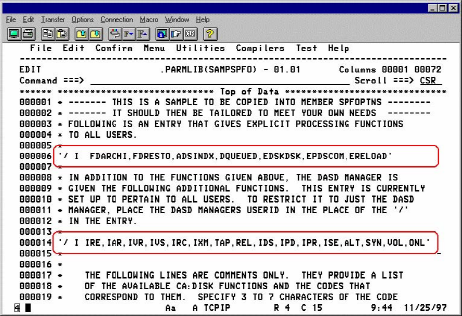
The sample options members SAMPSPFO and SAMPDMCO supplied with your system are already set up with entries that can be further tailored for your installation. If you have not already done so, copy them in to create members SPFOPTNS and DMCOPTNS. Two sample entries exist in the member SAMPSPFO. The first entry specifies the ISPF functions that are normally given to all CA Disk users. The second entry specifies the ISPF functions that are to be given to only those persons responsible for DASD management.
The two entries are shown in the following illustration:
|
Copyright © 2015 CA Technologies.
All rights reserved.
|
|