

Product: CA Datacom®/DB
Release: 15.00
OS: z/OS
This scenario describes how a database administrator (DBA) performs a successful Version 14.0 to Version 15.0 upgrade of a single active Multi-User Facility (MUF) instance. The term active means that the MUF is enabled and application requests are being processed against the following resources:
This Knowledge Base Article constitutes a portion of the official CA product documentation for this CA product. This Knowledge Base Article is subject to the following notices, terms and conditions.
The upgrade from CA Datacom/DB Version 14.0 to Version 15.0 is different from all prior version upgrades. This difference is because the CXX release stays at 14.0 and supports access from either a Version 14.0 or Version 15.0 MUF. The CXX is becoming release independent and it will probably remain so going forward just as the LXX, FXX, and database data areas have been up to this point.
Since the CXX no longer goes through a conversion process as a part of the upgrade, the term "upgrade" in Version 15.0 only refers to the system database resources associated with a Version 14.0 CA Datacom/DB MUF. The database resources are:
In all cases, the MUF must already be running at the CA Datacom Version 15.0 code level before performing any part of the Version 14.0 to 15.0 Active MUF upgrade process.
The following databases can be open and active in MUF at the time the CA Datacom Datadictionary upgrade process is performed:
Note: There should be no CICS Datadictionary On-line (DDOL) or CA Ideal (IDEA) user sessions attached at the time the Datadictionary upgrade process is performed. The CA Dataquery (DQ) database (default DBID 003) needs to be closed in MUF during its upgrade so no CICS Dataquery (DQRY) sessions can be attached and no batch DQ jobs running at the time it is upgraded.
There is not a requirement to perform all three upgrades at the same time. However, the CA Datacom Datadictionary upgrade must be successfully completed before the other two.
As a DBA in your mainframe environment, you can install, maintain, deploy, configure, and customize features for the database product. The information that follows describes how to successfully upgrade one Version 14.0 candidate MUF environment to Version 15.0.
Benefits
The following graphic shows the workflow that is associated with creating and utilizing the CA Datacom/DB Parallel Upgrade process.
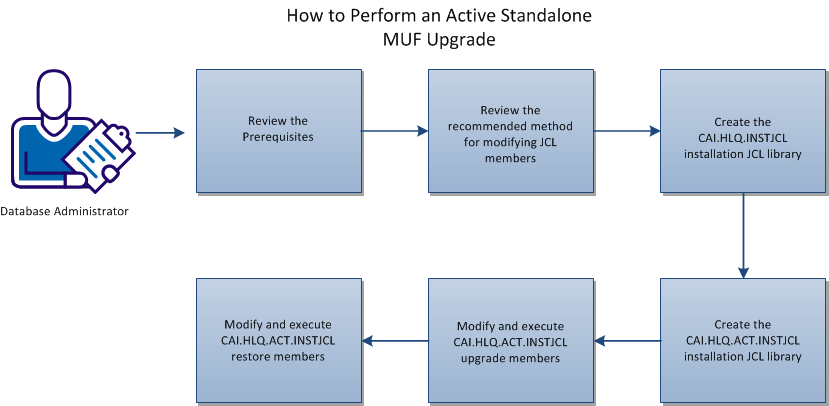
Before you perform an Active MUF Version 15.0 upgrade, complete the following prerequisites:
Important! To update the variables in all installation JCL members, use the CAI.THLQ.CABDSAMP member $DCBDEDT. This method is preferable to editing each individual member manually.
The $DCBDEDT member contains the macro ISREDIT. Updating and saving the $DCBDEDT member in your SYSPROC or TSO CLIST dataset allows all the variables in each Parallel Upgrade JCL member to be modified to site standards before submission.
After you modify the $DCBDEDT member, save it to your SYSPROC or TSO CLIST dataset using any name that you want. In the following steps, UPG15 is used as the name of the modified and saved $DCBDEDT macro. When you enter the UPG15 command, the edit macro is activated to allow custom tailoring of each JCL member before submission.
Example
The following three ISREDIT macro entry examples contain a "from" character string followed by a "to" character string. Change the “to” character string to a value that matches your sites standards.
/* WKSHT #2  */
ISREDIT C ALL "CAI.SHLQ"   "CAI.SHLQ"
/* WKSHT #3  */
ISREDIT C ALL "CAI.THLQ"   "CAI.THLQ"
/* WKSHT #4  */
ISREDIT C ALL "CAI.CHLQ"   "CAI.CHLQ"
This task is the beginning point for any of the Version 14.0 to Version 15.0 upgrade methods. It needs to be performed for each MUF being upgraded since the group of datasets and their contents are unique to a specific MUF. When edited and executed, the CAI.THLQ.CABDSAMP dataset member BDCUS00 creates and populates the following:
Follow these steps:
In the CAI.HLQ.INSTJCL dataset are BDCUS JCL members. These members can be used to perform a new Version 15.0 installation or any one of the three available Version 14.0 to 15.0 upgrade processes. The JCL members are:
This task is the starting point for the Version 14.0 to 15.0 Active MUF Upgrade process. The following steps create a CAI.HLQ.ACT.INSTJCL dataset. This dataset contains the required JCL members to successfully upgrade one active MUF from Version 14.0 to Version 15.0.
Follow these steps:
The following CAI.HLQ.ACT.INSTJCL members are used to upgrade system resources for one Active MUF to Version 15.0. The required system resources to upgrade are the CA Datadictionary component, CA Dataquery component, and the Dynamic System Tables database. The required JCL members to accomplish these upgrades are presented in the CA recommended order.
Every JCL member is re-runnable. If an error is encountered, correct the error, and simply resubmit it until a successful execution is accomplished. It is recommended that the DD, DDD, DQ, and DST system resource upgrades all be done at the same time unless there are special circumstances that prevent this from occurring.
Follow these steps:
Type UPG15 in the command line and press Enter. The ISREDIT macro is invoked, and all the member variables are changed to your site standards.
Submit the member for execution and then cancel out of it so the changes are not saved.
Type UPG15 in the command line and press Enter. The ISREDIT macro is invoked, and all the member variables are changed to your site standards.
Submit the member for execution and then cancel out of it so the changes are not saved.
Type UPG15 in the command line and press Enter. The ISREDIT macro is invoked, and all the member variables are changed to your site standards.
Submit the member for execution and then cancel out of it so the changes are not saved.
Type UPG15 in the command line and press Enter. The ISREDIT macro is invoked, and all the member variables are changed to your site standards.
Submit the member for execution and then cancel out of it so the changes are not saved.
Type UPG15 in the command line and press Enter. The ISREDIT macro is invoked, and all the member variables are changed to your site standards.
Submit the member for execution and then cancel out of it so the changes are not saved.
Type UPG15 in the command line and press Enter. The ISREDIT macro is invoked, and all the member variables are changed to your site standards.
Submit the member for execution and then cancel out of it so the changes are not saved.
This task completes the Active MUF Upgrade process for one candidate Version 14.0 MUF instance. To upgrade another candidate 14.0 MUF to Version 15.0, return to "Create the CAI.HLQ.INSTJCL Installation JCL Library" and repeat all the steps.
The following CAI.HLQ.ACT.INSTJCL members are available for restoring a Version 15.0 system resource back to Version 14.0. Since all Version 14.0 and 15.0 system resources are compatible across versions, needing to perform any of these restores would be extremely rare. If one or more Version 15.0 system resources cannot remain at that level, select the appropriate restore JCL member from the following, edit it and run it.
Locate CAI.HLQ.ACT.INSTJCL member BDACTDDR. This JCL member executes DBUTLTY to load the Version 14.0 CXX, DD, DDD, and ADRPNL dataset backups that JCL member BDACTDD1 created. Type UPG15 in the command line and press Enter. The ISREDIT macro is invoked, and all the member variables are changed to your site standards. Submit the member for execution and then cancel out of it so the changes are not saved.
Locate CAI.HLQ.ACT.INSTJCL member BDACTDQR. This JCL member executes the Version 14.0 CA Dataquery DQLANGMT utility to revert the Dataquery database DQM data area tables back to version 14.0. Type UPG15 in the command line and press Enter. The ISREDIT macro is invoked, and all the member variables are changed to your site standards. Submit the member for execution and then cancel out of it so the changes are not saved.
Locate CAI.HLQ.ACT.INSTJCL member BDACTDYR. This JCL member executes DDUPDATE to remove the Version 15.0 Dynamic System Tables database and replace it with the Version 14.0 equivalent. Type UPG15 in the command line and press Enter. The ISREDIT macro is invoked, and all the member variables are changed to your site standards. Submit the member for execution and then cancel out of it so the changes are not saved.
This Documentation, which includes embedded help systems and electronically distributed materials, (hereinafter referred to as the “Documentation”) is for your informational purposes only and is subject to change or withdrawal by CA at any time. This Documentation is proprietary information of CA and may not be copied, transferred, reproduced, disclosed, modified or duplicated, in whole or in part, without the prior written consent of CA.
If you are a licensed user of the software product(s) addressed in the Documentation, you may print or otherwise make available a reasonable number of copies of the Documentation for internal use by you and your employees in connection with that software, provided that all CA copyright notices and legends are affixed to each reproduced copy.
The right to print or otherwise make available copies of the Documentation is limited to the period during which the applicable license for such software remains in full force and effect. Should the license terminate for any reason, it is your responsibility to certify in writing to CA that all copies and partial copies of the Documentation have been returned to CA or destroyed.
TO THE EXTENT PERMITTED BY APPLICABLE LAW, CA PROVIDES THIS DOCUMENTATION “AS IS” WITHOUT WARRANTY OF ANY KIND, INCLUDING WITHOUT LIMITATION, ANY IMPLIED WARRANTIES OF MERCHANTABILITY, FITNESS FOR A PARTICULAR PURPOSE, OR NONINFRINGEMENT. IN NO EVENT WILL CA BE LIABLE TO YOU OR ANY THIRD PARTY FOR ANY LOSS OR DAMAGE, DIRECT OR INDIRECT, FROM THE USE OF THIS DOCUMENTATION, INCLUDING WITHOUT LIMITATION, LOST PROFITS, LOST INVESTMENT, BUSINESS INTERRUPTION, GOODWILL, OR LOST DATA, EVEN IF CA IS EXPRESSLY ADVISED IN ADVANCE OF THE POSSIBILITY OF SUCH LOSS OR DAMAGE.
The use of any software product referenced in the Documentation is governed by the applicable license agreement and such license agreement is not modified in any way by the terms of this notice.
The manufacturer of this Documentation is CA.
Provided with “Restricted Rights.” Use, duplication or disclosure by the United States Government is subject to the restrictions set forth in FAR Sections 12.212, 52.227-14, and 52.227-19(c)(1) - (2) and DFARS Section 252.227-7014(b)(3), as applicable, or their successors.
Copyright © 2014 CA. All rights reserved. All trademarks, trade names, service marks, and logos referenced herein belong to their respective companies.
|
Copyright © 2014 CA.
All rights reserved.
|
|