

Numbers are compared according to their algebraic value. In some cases, one of the operands must be converted to another data type before the comparison operation is performed.
Conversion implies that each of the two values are represented in a form compatible for the comparison operation.
This conversion is performed automatically when the specified operands are of different data types. General rules for conversion during a comparison operation are:
The following table lists the conversions that must take place before two numbers can be compared.
To determine the data type used in the comparison operation, locate the data type of the first operand in the left column. Next, locate the data type of the second operand in the vertical columns to the right.
The data type specified at the intersection of the two columns is the data type used in the actual comparison operation. In some cases, this data type is different from that of both operands, indicating that both operands are converted before the comparison is made.
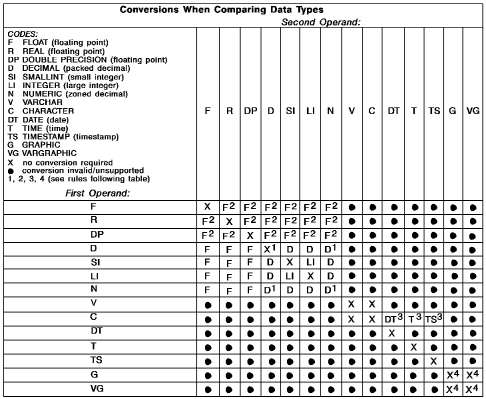
Note: Be aware that there is one exception to the information in this table. Normally, there is no comparison of any type of a number with character data, but an equal (=) comparison is allowed between unsigned numeric (zoned decimal) data and character data of the same length for joins between tables. Because this is also allowed when both operands are in the same table, a join does not have to be involved, but the exception was made to facilitate joining tables designed at different times. The exception works for equal comparisons of the same length by treating the unsigned zone field as a character column for comparison purposes.
In the previous tables, the following numbered rules are referenced:
For decimal numbers, the comparison is done in DECIMAL form. The number with the smallest scale is extended with zeros to match the scale of the other number before the comparison.
Any number compared to a floating-point number must be converted to FLOAT. Two floating-point numbers are equal only if the bit configurations of their normalized form are identical.
See the information about dates, times, and timestamps on Comparisons for Dates, Times, and Timestamps.
MIXED Data Considerations: In SQL, string comparisons are strictly byte-for-byte, so predicates involving MIXED strings may not give the desired results. For instance, a string with the SBCS version of XYZ does not compare as equal to a string with a Shift-Out, then the DBCS version of XYZ, then a Shift-In. You can use the VARGRAPHIC scalar function to normalize both strings into VARGRAPHIC data types before doing the comparison.
|
Copyright © 2014 CA.
All rights reserved.
|
|