

AVGPERF rowsets provide a processing average based on a standard duration of one hour. Each value is calculated on the amount of work done divided by the total duration hours.
AVGPERF records provide a specific function and only be created when trying to compare average performance from two different durations or work periods.
Note: AVGPERF records should not be generated from data that represents a small duration period (less than an hour). For example, when building an AVGPERF from a duration of .001 hours, the work values would be divided by one one-thousandth which actually results in the values being multiplied by a 1000. With such a large multiplication value, the relative performance values have significant variance possibilities.
After you have collected and displayed data for performance monitoring from varying duration lengths, it may be useful to have average performance AVGPERF rowsets.
In the examples, we saw how you could use the SUMMARY function to combine various Delta rowsets into weekly Summary rowset for week-to-week comparison.
In the following example, we build average performance rowsets from a two day period versus the average performance from a previous week.
AVGPERF Function Example
In the previous SUMMARY Function Example 2, we had Summary records constructed for each of the four weeks in June and various INTERVAL and LAST rowsets.
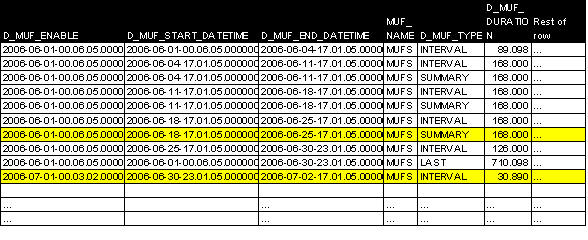
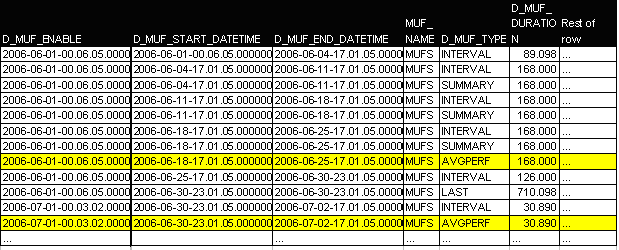
We can create an AVGPERF rowset for the Summary rowset from June 25 and the INTERVAL ending on July 2.
|
|
AVGPERF for 0625 Summary |
AVGPERF for 0702 Summary |
|---|---|---|
|
OPTION |
AVERGPERF |
AVERGPERF |
|
MUFNAME |
MUFS |
MUFS |
|
TYPE |
SUMMARY |
INTERVAL |
|
DATERG |
2006062520060625 |
2006070220060702 |
|
TIMERG |
160000185900 |
160000185900 |
After completing the AVGPERF runs, you would have two new rowsets inserted into the Delta tables.
|
Copyright © 2014 CA.
All rights reserved.
|
|