

The following examples explain the use of Summary rowsets:
SUMMARY Function Example 1
In this example, the user has an automated process that creates one Snapshot rowset just before MUF is cycled every night. The user executes the AUTOCOLL OPTION=DELTACRE function and the corresponding Delta rowsets have been created.
However, for a given month, there are 30 Delta rowsets which would be too much data to look at and the time slices are too small to easily detect trends. It would be easier if the data was represented as weekly statistics.
Delta Rowsets
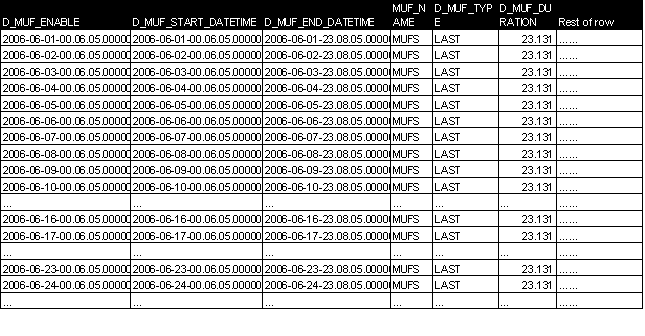
In this case, the user would like to have the data summarized into four weeks of data: weeks ending 6/9, 6/16, 6/23, and 6/30.
By running one AUTOCOLL OPTION=SUMMARY for each week, the user can create four separate Summary rowsets, providing the weekly totals.
The following are the execution parameters for the four separate OPTION=SUMMARY functions:
|
|
Summary for |
Summary for Week 2 |
Summary for Week 3 |
Summary for Week 4 |
|---|---|---|---|---|
|
OPTION |
SUMMARY |
SUMMARY |
SUMMARY |
SUMMARY |
|
MUFNAME |
MUFS |
MUFS |
MUFS |
MUFS |
|
TYPE |
LAST |
LAST |
LAST |
LAST |
|
DATERG |
20060603 |
20060610 |
20060617 |
20060624 |
|
TIMERG |
000000 240000 |
000000 240000 |
000000 240000 |
000000 240000 |
After the fourth function completes, the Delta database now contains four Summary rowsets. Each rowset represents the sum of the selected LAST rowsets. The SUMMARY function does not remove or delete any information being summarized.
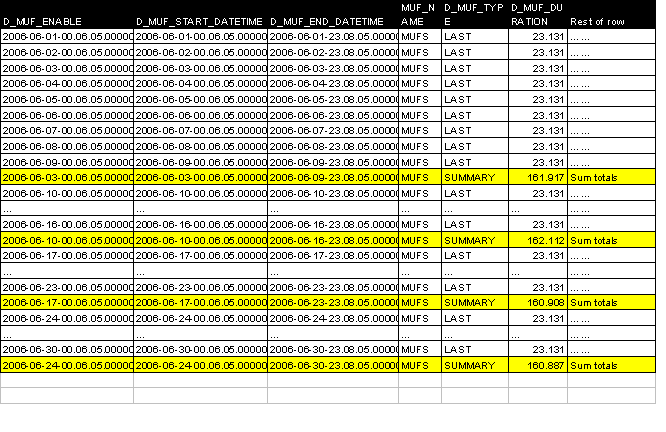
Using AUTOCOLL OPTION=DSVOUT or another available tool, the user can easily select just the summary rowsets for processing into a weekly statistical report.
SUMMARY Function Example 2
A user has a source MUF that comes down once a month on the last day of the month. For four weeks of the month, they have one Delta rowset INTERVAL that was created on Sunday at 5 PM, but for the end of the month week, they have two rowsets from different MUF executions that represent the weekly period.
In this example, rather than summarizing that one week where there are two rowsets, it would be simpler for later reporting and selection purposes for the user to build one Summary rowset for each week, even though it would be the same as the INTERVAL rowset for three of the four weeks.
Note: In this example, the user excluded the LAST rowset to avoid creating a summary with data counted twice.
Delta Rowsets:
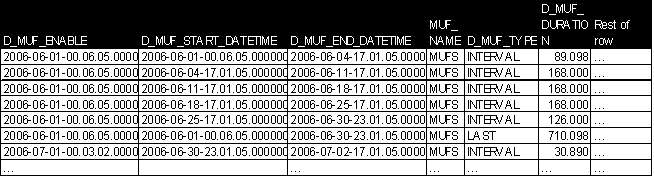
For this example, the user would like to have the data summarized into four weeks of data: weeks ending on 6/11, 6/18, 6/25, and 7/2.
Running one summary pass for each week, we could create four equal weekly Summary rowsets.
The following are the execution parameters:
|
|
Summary for Week 1 |
Summary for Week 2 |
Summary for Week 3 |
Summary for Week 4 |
|---|---|---|---|---|
|
OPTION |
SUMMARY |
SUMMARY |
SUMMARY |
SUMMARY |
|
MUFNAME |
MUFS |
MUFS |
MUFS |
MUFS |
|
TYPE |
INTERVAL |
INTERVAL |
INTERVAL |
INTERVAL |
|
DATERG |
20060604 |
20060611 |
20060618 |
20060625 |
|
TIMERG |
000000 240000 |
000000 240000 |
000000 240000 |
000000 240000 |
After the fourth execution, the Delta rowsets would now contain four Summary rowsets. Each Summary rowset would represent the sum and totals of the selected rows. The SUMMARY function does not remove or delete any of the information being summarized.
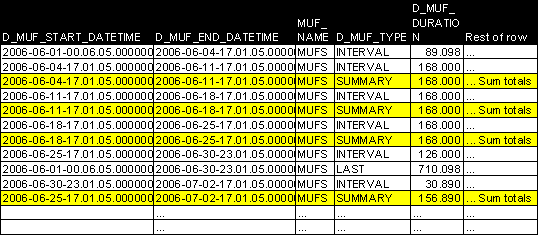
Using AUTOCOLL OPTION=DSVOUT or another available tool, the user can now easily select just the summary rows for processing into a weekly statistical report.
|
Copyright © 2014 CA.
All rights reserved.
|
|