

Positioning is either BEFORE or AFTER the first or last row of the result set, or it is based on the ABSOLUTE or RELATIVE position in the result set.
The position value must be an integer literal or host variable.
The cursor is positioned to the row specified from the beginning, or end if negative, of the result set. If the position is zero, the cursor is positioned before the first row of the set. If the position value is greater than the number of rows in the result set, a warning is issued and the position is changed to after the last row.
Examples with a set of 100 rows:
0 - cursor is positioned before first row of set, no data returned.
10 - cursor is positioned on the tenth row of the set, data returned (unless a hole with the static sensitive cursor mode).
-1 - cursor is positioned on the last row of the set.
101 - cursor is positioned after the last row of the set, no data returned, warning issued.
-101 - cursor is positioned before the first row of the set, no data returned, warning issued.
The cursor is positioned from the current position. A negative value positions backwards, and a positive value forwards. Zero returns the current row; however, if the current row has been deleted or updated such that it no longer qualifies, then the next row of the set is returned for the dynamic sensitive cursor mode.
0 - the same row is returned. If it has been deleted or no longer qualifies for a sensitive dynamic cursor, then the next row is returned.
+10 - cursor is moved forward 10 rows, and data returned (unless a hole with the static sensitive cursor mode). If position is after the last row of the set, a warning is returned and no data returned.
-1 - cursor is positioned backwards one row.
+101 - cursor is positioned after the last row of the set, no data returned, warning issued.
-101 - cursor is positioned before the first row of the set, no data returned, warning issued.
Cursors are declared insensitive, sensitive static and sensitive dynamic, but there is also the option of specifying insensitive or sensitive on the fetch.
|
Declare |
Fetch |
Fetch |
|---|---|---|
|
Insensitive |
Not needed since |
Error returned; no effect on cursor |
|
Sensitive Dynamic |
Error returned; no effect on cursor. |
Row is returned from the database, reflecting changes made by this transaction, and other committed changes. |
|
Sensitive Static |
Returns row as is |
|
|
Any |
|
|
Kalpana Shyam of IBM Silicon Valley Lab provided the table below in her presentation "Scrollable Cursors: Fetching Opportunities for DB2 for OS/390" at the DB2 and Business Intelligence Technical Conference, October 16-20, 2000.
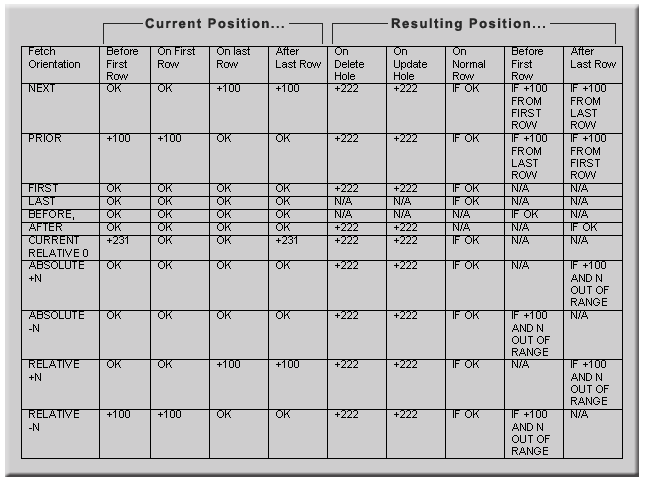
Note: If a fetch encounters an update or delete hole, a +222 SQLCODE is returned to the program.
SQLCA
|
Field |
Value |
Meaning |
|---|---|---|
|
SQLWARN1 |
N |
Non-scrollable |
|
SQLWARN1 |
S |
Scrollable |
|
SQLWARN4 |
I |
Insensitive |
|
SQLWARN4 |
S |
Sensitive static |
|
SQLWARN5 |
1 |
Read-only implicitly or explicitly |
|
SQLWARN5 |
2 |
Select and delete allowed on result table |
|
SQLWARN5 |
3 |
Select, delete, and update allowed on result table |
Specify the name of a cursor that is defined in a DECLARE CURSOR statement of your program. The DECLARE CURSOR statement must precede the FETCH statement in your source program. When the FETCH statement is executed, the cursor must be in the open state.
If INTO is used, each host-variable you specify must identify a variable that is described in your program in accordance with the rules for declaring host variables. The host variables must be separated by commas.
The first value in the result row is assigned to the first variable in the list, the second value to the second variable, and so on. If the number of variables is not the same as the number of values in the row, the SQLCA-WARNING(4) field of the SQLCA is set to W.
The data type of a variable must be compatible with the value assigned to it. If the value is numeric, the variable must have the capacity to represent the integral part of the value. If the value is null, an indicator variable must be specified.
Each assignment to a variable is made according to the rules described in Basic Operations (Assignment and Comparison) Assignments are made in sequence through the list. If an assignment error occurs, the value is not assigned to the variable, and no more values are assigned to variables. Any values that have already been assigned to variables remain assigned.
This clause allows the row of a result table of a cursor to be fetched into variables which are determined at execution-time. Descriptor-name identifies a SQL Descriptor Area (SQLDA) that contains a valid description of zero or more host variables. The length of the SQLDA, as indicated by SQLABC, must be sufficient to describe the number of variables indicated by SQLD. The first value of a row corresponds to the first variable described by the SQLDA, the second value to the second variable, and so on. For more information about the SQLDA, see SQL Descriptor Area (SQLDA).
Note: A cursor referenced in an UPDATE or DELETE statement must be positioned on a row. A cursor can only be positioned on a row as a result of a FETCH statement. If an error occurs during the execution of a FETCH statement that makes the position of a cursor unpredictable, the cursor is closed.
|
Copyright © 2015 CA Technologies.
All rights reserved.
|
|