

When you import users from an LDAP directory, you can specify how CA DataMinder handles 'unknown' users or groups. These are users and groups in your existing CA DataMinder user hierarchy that are not present in the LDAP directory. Specifically, you can move them to an 'exceptions' group. This can be any existing group that falls within your management group. However, be aware that this reorganization only affects CA DataMinder users within the specified parent group. Unknown users outside of this branch of the user hierarchy are not reorganized.
The following example specifies the Management group as the destination for imported users. If required you can move any unknown users within this group or its subgroups to an exceptions group. However, any unknown users outside of this group or its subgroups are not reorganized. For example, unknown users in the Sales group are not reorganized into the exceptions group.
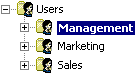
Example CA DataMinder user hierarchy
The Management group is the target parent group for imported users. Unknown users in the Marketing and Sales groups are not reorganized.
|
Copyright © 2012 CA.
All rights reserved.
|
|