

When you export the user hierarchy (or a branch of the hierarchy) to a spreadsheet, there are no column headings. This topic describes what information appears in each column. The actual combination of columns varies according to which details are exported:
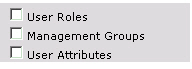
This combination results in these spreadsheet columns:
Column A: CA DataMinder user name.
Column B: The user's full name.
Columns C to [n]: The descending sequence of parent groups, starting with the root level group for the current export job (column C) and finishing with the user's immediate parent group (column [n]).
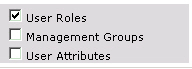
This combination results in these spreadsheet columns:
Column A: CA DataMinder user name.
Column B: The user's full name.
Column C: The user's role, for example, Reviewer or User.
Columns D to [n]: The descending sequence of parent groups, starting with the root level group for the current export job (column D) and finishing with the user's immediate parent group (column [n]).
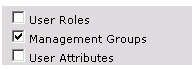
This combination results in these spreadsheet columns:
Column A: CA DataMinder user name.
Column B: The user's full name.
Column C: The user's management group. This column is blank if no management group has been defined.
Columns D to [n]: The descending sequence of parent groups, starting with the root level group for the current export job (column D) and finishing with the user's immediate parent group (column [n]).
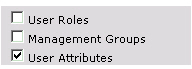
This combination results in these spreadsheet columns:
Column A: CA DataMinder user name.
Column B: The user's full name.
Columns C-L: The user's attributes, corresponding to the ten customized attributes available for users in your CA DataMinder installation. For example, column 3 corresponds to User Attribute 2. Columns are blank if no attribute value has been set.
Columns M to [n]: The descending sequence of parent groups, starting with the root level group for the current export job (column M) and finishing with the user's immediate parent group (column [n]).
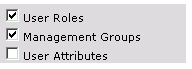
This combination results in these spreadsheet columns:
Column A: CA DataMinder user name.
Column B: The user's full name.
Column C: The user's role, for example, Reviewer or User.
Column D: The user's management group. This column is blank if no management group has been defined.
Columns E to [n]: The descending sequence of parent groups, starting with the root level group for the current export job (column E) and finishing with the user's immediate parent group (column [n]).
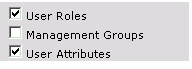
This combination results in these spreadsheet columns:
Column A: CA DataMinder user name.
Column B: The user's full name.
Column C: The user's role, for example, Reviewer or User.
Columns D-M: The user's attributes, corresponding to the ten customized attributes available for users in your CA DataMinder installation. For example, column 3 corresponds to User Attribute 2. Columns are blank if no attribute value has been set.
Columns N to [n]: The descending sequence of parent groups, starting with the root level group for the current export job (column N) and finishing with the user's immediate parent group (column [n]).
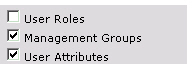
This combination results in these spreadsheet columns:
Column A: CA DataMinder user name.
Column B: The user's full name.
Column C: The user's management group. This column is blank if no management group has been defined.
Columns D-M: The user's attributes, corresponding to the ten customized attributes available for users in your CA DataMinder installation. For example, column 3 corresponds to User Attribute 2. Columns are blank if no attribute value has been set.
Columns N to [n]: The descending sequence of parent groups, starting with the root level group for the current export job (column N) and finishing with the user's immediate parent group (column [n]).
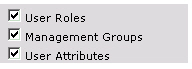
This combination results in these spreadsheet columns:
Column A: CA DataMinder user name.
Column B: The user's full name.
Column C: The user's role, for example, Reviewer or User.
Column D: The user's management group. This column is blank if no management group has been defined.
Columns E-N: The user's attributes, corresponding to the ten customized attributes available for users in your CA DataMinder installation. For example, column 3 corresponds to User Attribute 2. Columns are blank if no attribute value has been set.
Columns O to [n]: The descending sequence of parent groups, starting with the root level group for the current export job (column O) and finishing with the user's immediate parent group (column [n]).
|
Copyright © 2012 CA.
All rights reserved.
|
|