

The custom format is produced by the XSL transform user-role-summary.xsl:
<?xml version="1.0" encoding="utf-8" ?>
<xsl:stylesheet version="1.0"
     xmlns:xsl="http://www.w3.org/1999/XSL/Transform">
     <xsl:import href="../common.xsl"/>
     <xsl:output method="html" indent="yes"/>
     <xsl:template match="/">
          <html>
                <head>
                      <base target="_self"/>
                      <script type="text/javascript" src="scripts/common.js"/>
                </head>
                <body>
                      <div class="reportsHeader">
                                  <h1>
                                    <xsl:value-of select="//search/@label"/>
                                  </h1>
                                  <h2>
     <xsl:value-of
select="//search/@description"/>
                                  </h2>
     <xsl:for-each select="//row[not(role=preceding-sibling::row/role)]/role">
     <xsl:variable name="role" select="text()"/>
                                 <h3>These users hold the <xsl:value-of select="$role"/> role:</h3>
                                      <table id="tblUserRoleSummary" cellpadding="0" cellspacing="0" border="0">
                                      <thead>
                                      <th>Group</th><th>User Name</th>
                                      </thead>
                                      <tbody>
      <xsl:for-each select="//search/results/row[role=$role]">
                                     <tr>
                                     [assign the value for TD in your book] <xsl:value-of select="groupname"/></td>
                                     [assign the value for TD in your book]<xsl:value-of select="username"/></td>
                                     </tr>
      </xsl:for-each>
                                     </tbody>
                                     </table>
                                     </xsl:for-each>

                                     </div>
                                     </body>
                                     </html>
                                     </xsl:template>
                                     </xsl:stylesheet>
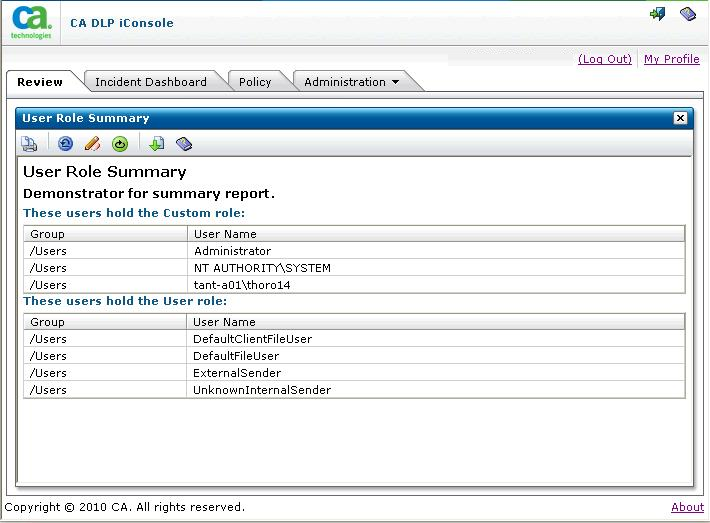
Search Results page showing the custom format
|
Copyright © 2012 CA.
All rights reserved.
|
|