

|
|
|
The Output key contains a mailbox subkey and a location subkey (CSXMailSource and MailSource1 in the example below):
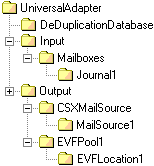
Within the mailbox subkey (CSXMailSource), configure the following registry settings:
Type: REG_SZ
Data: This is the type of the single output specified by the Outputs registry value in the Inputs registry key. For IBM DB2 CommonStore integration, this must be set to 'EXCH' in order to output emails to an Exchange mailbox.
Type: REG_SZ
Data: Defaults to No. Each email processed by the Universal Adapter can be given a unique ID. If set to Yes, this ID is stored as a specific MAPI property in the output e‑mail. You also need to specify here which MAPI property you want to use to store the ID, for example:
Yes, PS_PUBLIC_STRINGS, NAME=X-Orch-UniqueID
The example above stores the unique ID in a MIME transmittable property called 'X-Orch-UniqueID'.
Type: REG_SZ
Data: This is the name of the secondary output pool. It must be set to the name of an existing EVF output pool, for example, EVFPool1.
Type: REG_DWORD
Data: This is the archive identifier. That is, it specifies the data type stored within the EVF file created as the secondary output. Together with the event identifier, it enables the RDM to retrieve events from a third party archive during a subsequent event search. For IBM DB2 CommonStore configuration, this must be set to 6.
Within the location subkey (MailSource1), configure the following registry settings:
Type: REG_SZ
Data: This setting specifies the name or IP address of the Exchange server hosting the mailbox you want to output to.
Type: REG_SZ
Data: This setting specifies the name of the Exchange mailbox you want to output the processed emails to. For IBM DB2 CommonStore configuration, set this to, for example, MailSource1.
| Copyright © 2011 CA. All rights reserved. | Email CA Technologies about this topic |